The Malkai reservation workspace
A human-led reservation workspace for the pre-book experience — stages two to five of a nine-stage journey, from first enquiry to the deposit that confirms it.
Explore prototype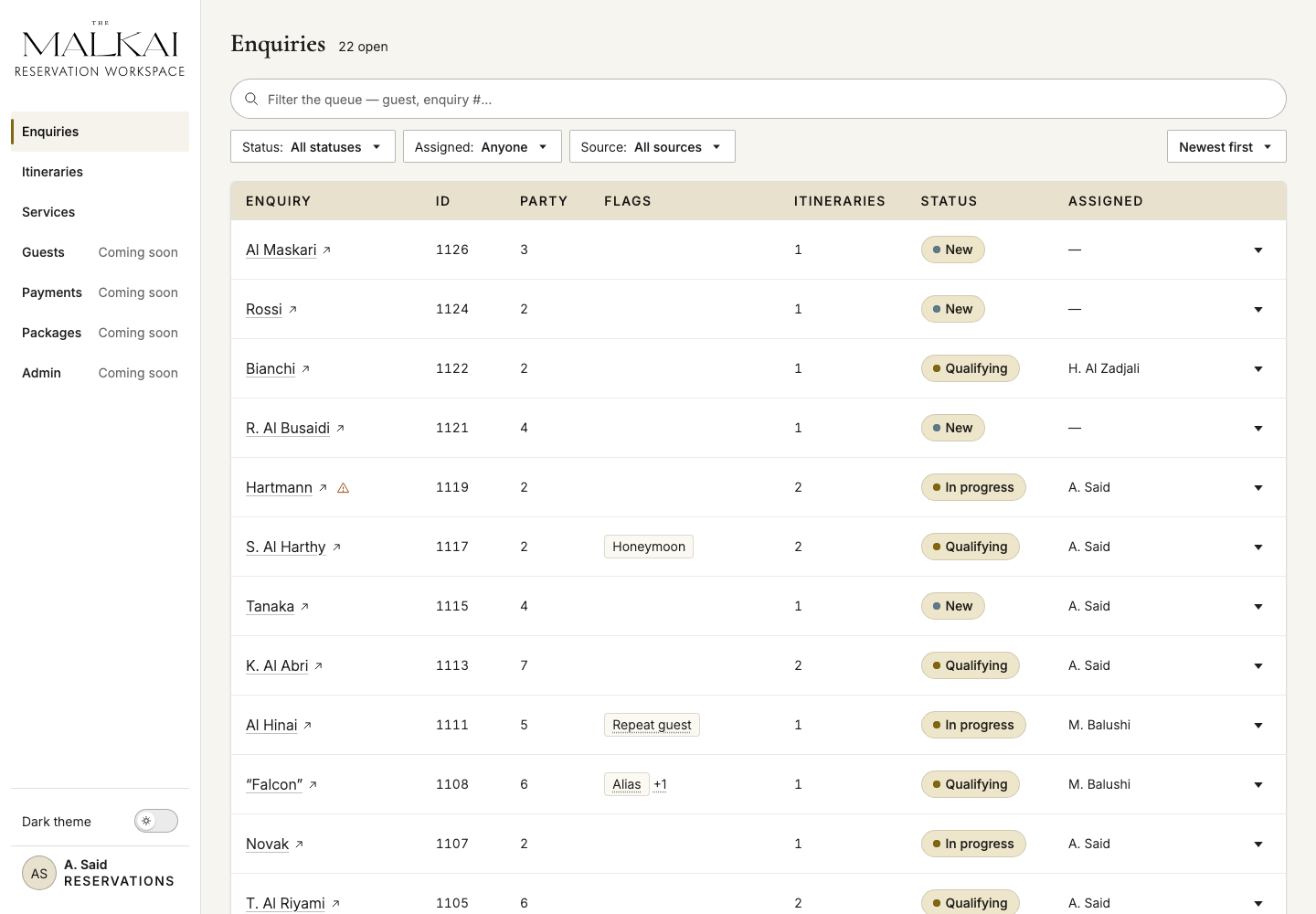
Decision summary
A connected pre-booking workflow: agents can move from enquiry to itinerary, review approvals and prepare the guest proposal, with the deposit marking the booking boundary.
What the project is
A human-led booking platform for high-touch journeys across Oman.
The Malkai is not a self-service booking engine. It is a mid-office for the people who design and operate personalised multi-property journeys. The guest relationship stays with experienced staff; the platform gives them one operational memory from first enquiry through itinerary, approval, payment, and a controlled guest-facing proposal.
Where enquiries start
Channels
- Website
- Phone
- Referral
- Travel partner
Direct and trade enquiries can begin anywhere before they enter the operating flow.
The Malkai mid-office
Product boundary
- Enquiry
- Itinerary
- Approval
- Deposit
- CRMGuest context
- OperaRates and inventory
It connects CRM context, Opera rates and inventory, internal decisions, and controlled guest-facing outputs.
What the guest receives
Journey
- Barkaa
- Hajar
- Sharqiyah
One personalised route with stays, services, experiences, approvals, and payment, sent as a controlled proposal.
Who the workspace serves
Reservation agents coordinate the booking. Other teams make it possible.
The reservation agent connects the guest request, supplier responses and internal decisions. The roles below explain who contributes to that work and where the prototype stops.
Guests and external partnersNo workspace account
- Guest or booker
- PA / secretary
- Trade agent / DMC
- ~30 external suppliers
- Sales & marketing
Property operations and administrationWider product, outside this prototype
- Murshid
- Experience / Supplier Manager
- System Administrator
Booking and approvalsIn this prototype
Reservation agentcoordinates the booking
- Head Murshid
- Revenue
- General manager
- Finance
- Reservations Manager
Booking and approvals
The teams involved from enquiry to deposit, with the reservation agent coordinating the work.
-
Reservation agent
Captures the enquiry, understands guest needs, composes itinerary options and coordinates confirmations through to the deposit.
travel designer in guest-facing copy, Assigned in internal labels
-
Head Murshid
Approves every itinerary revision before it is published to the guest — including an unchanged standard package — reviewing the whole route for deliverability, timing, quality and consistency with the agreed conditions.
separate from the assigned Murshid who later executes the journey
-
Revenue
The commercial authority in the required approval sets: rate deviations, custom routes, accommodation-content revisions. Interchangeable with the GM where the baseline says “GM or Revenue”.
-
General manager
Property leadership. Approves route reversal and resequencing, holds the leadership visibility scopes, and is alerted directly on medical and security flags.
-
Finance
Owns payment methods, beneficiaries, typed payment instructions, offline receipt evidence, refunds and the accounting handoff. The workspace tracks payment status alongside the itinerary.
-
Reservations Manager
The authority over what an agent may request but not execute: terminal cancellation on a committed itinerary, back-dated services, recovery of a failed confirmation command, rotating a guest credential.
Property operations and administration
Roles defined in the wider product scope. Their dedicated workflows are outside this prototype.
-
Murshid
The on-property service role. In the MVP a read-only mobile view that shows only their own guests.
never “guide”
-
Experience / Supplier Manager
Owns the supplier, contract and external-service catalogue: registering suppliers and contract versions, creating immutable service versions, maintaining categorisation and markup.
-
System Administrator
User provisioning and offboarding, credential rotation, bulk customer-relationship operations.
an administration authority, not a business approver
Guests and external partners
People the agent works with through proposals and direct communication, without a staff workspace account.
-
Guest or booker
Receives a composed proposal on its own shareable page. There is no login, no live availability and no self-service anywhere: the online path ends at enquiry submission and every subsequent step is agent-led.
-
PA / secretary
Coordinates on behalf of the traveller. The enquiry must distinguish the contact person from the guests.
-
Trade agent / DMC
Books on the guest’s behalf on commissionable or net rates, on 30–45 day credit rather than a deposit link. May reach sales first and be routed to reservations afterwards.
-
~30 external suppliers
Provide experiences, transfers and external services. Agents contact suppliers directly and record the responses; there is no supplier integration in the proposed workflow.
-
Sales & marketing
Lead generation, campaigns and trade relationships, with no mid-office access. Hands trade contacts over to reservations.
Journey & coverage
Nine stages. The prototype designs four of them, and stops at the deposit.
The team mapped the guest's journey end to end before any surface existed — nine stages, seven layers, three personas. Laying the prototype over it makes the product's real perimeter visible: everything we drew sits in the pre-book experience, stages two to five, and the last thing it does is take a deposit.
Guest sentiment
- Direct HNI
- Trade / DMC
- Repeat guest
Working hypothesis, not measured guest feedback
How to read the map
- RequirementA rule recorded in the product requirements.
- Open questionA decision that still needs clarification.
- Working hypothesisA proposed interpretation to validate with users.
- Future scopeWork beyond the current product scope.
Pre-book experience The deposit is the confirmation boundary
Guest sentiment 3 personas
All three curves trough at Decision & Deposit — exactly where the prototype ends.
Coverage
Stage
Guest action
Channel
Who acts
What it hinges on
Discovers Malkai and explores three predefined journeys with a tentative cost only.
themalkai.com, campaigns, trade & press
- Sales
- Trade / DMC
- Guest
No live availability and no self-booking anywhere on the site — by decision, not by omission.
Requirement
Sends an enquiry through whichever channel is at hand — often through a PA.
Web form, email, WhatsApp, phone, trade
- Guest
- PA
- Trade / DMC
- Agent
Every channel lands in one queue. Phone is the only one entered by hand — the call is not integrated.
Requirement
Gets an instant reply, then a personal one; shares dates, party, interests and consent.
Auto-reply, then a first personal response, call or WhatsApp
- Agent
- Resv. Manager
- GM
The response promise is stated as 2 hours in one client document and 5 in another. Still open.
Open question
Receives itinerary variants, each on its own shareable page; explores and reacts.
Live web itinerary link, branded PDF fallback
- Agent
- Head Murshid
- Revenue
- Suppliers
An itinerary cannot be sent until every activity is confirmed — and confirmation means a phone call.
Requirement
Agrees a variant and pays a 50% deposit — or takes the approved trade or manual path.
Provider-hosted payment link, trade credit
- Agent
- Finance
- Trade / DMC
Deposit receipt is the confirmation boundary. The payment link lives 15 minutes.
Requirement
Receives documents, picks complimentary experiences, shares allergies, meets the Murshid remotely.
Timed messages, preference sheet, Murshid introduction
- Agent
- Murshid
- GM
The handover pack is assembled by the agent two weeks out. No surface in our IA carries it.
Requirement
Arrives, is handed to a Murshid, moves across the three sites, asks for live amendments.
Murshid in person, the same WhatsApp thread, folio
- Murshid
- GM
- Supplier Mgr
Three properties run as three separate entities, with three Opera instances behind them.
Requirement
Checks out, settles a consolidated invoice, receives a follow-up and a satisfaction ask.
Final invoice, personal farewell, CSAT
- Finance
- Agent
- Sales
Lost-deal insight lives nowhere today — “why we lost two of them” has no home.
Requirement
Enquires again and is recognised — or goes cold and is nurtured until the next occasion.
Campaigns, personal outreach, trade re-engagement
- Sales
- Agent
Repeat-guest recognition at classification, from every source. Loyalty is explicitly later.
Future scope
What we designed
Stages 1 and 6–9 have no surface yet.
Guest sentiment by persona and journey stage, on a 0–100 scale. A team hypothesis, not client-validated.
Direct HNI: Dream & Awareness 68, Enquiry 62, First Response & Qualification 66, Journey Co-Design 86, Decision & Deposit 54, Confirmation & Pre-Arrival 76, In-Stay 90, Departure & Post-Stay 72, Return Loop 80.
Trade / DMC: Dream & Awareness 62, Enquiry 55, First Response & Qualification 60, Journey Co-Design 72, Decision & Deposit 50, Confirmation & Pre-Arrival 66, In-Stay 85, Departure & Post-Stay 66, Return Loop 70.
Repeat guest: Dream & Awareness 80, Enquiry 76, First Response & Qualification 84, Journey Co-Design 82, Decision & Deposit 64, Confirmation & Pre-Arrival 80, In-Stay 92, Departure & Post-Stay 76, Return Loop 86.
Where the prototype stops
The pre-arrival handover is a documented operational responsibility. It sits in stage six, beyond the enquiry-to-deposit scope shown in this case, and needs its own workflow.
What still needs validation
The sentiment curves are team hypotheses, not measured guest responses. Assumptions about channel usage and shift handoffs also need validation with the people doing the work.
The reservation agent
One role connects the request, the itinerary and the booking.
Reservation agents support a human-led booking process across three shifts. Each request combines guest preferences, availability across three properties, supplier confirmations and internal approvals. The workspace needs to keep those dependencies visible as the itinerary changes.
- 01
Understand the request
Bring enquiries from different channels into one record. Capture dates, party details, preferences and individual needs before proposing a route.
- 02
Compose the journey
Combine stays across three properties, check room availability and arrange services with external suppliers. Keep outstanding confirmations alongside the itinerary.
- 03
Prepare the booking
Coordinate approvals, prepare the guest proposal and track the deposit. Keep revisions and unresolved work visible until the itinerary is ready to proceed.
- 04
Hand over to operations
Prepare guest context and service requirements for the on-property team before arrival. This operational responsibility is documented, but its workspace is outside the prototype presented here.
Supplier confirmations happen outside the platform.
Accommodation availability comes from the PMS. Experiences and external services require direct contact with suppliers, with the outcome recorded by the reservation agent. A composed itinerary therefore brings together system data and manually confirmed information.
Design response: distinguish the source of each status and keep unresolved services visible in the itinerary.
Pending confirmations need a clear next action.
The proposal depends on supplier confirmations and internal approvals. The builder shows outstanding items for an itinerary, but does not yet provide a shared follow-up history or an overview across all active itineraries.
Next question: would a cross-itinerary follow-up view help agents prioritise their day? This needs validation with working reservation agents.
Service rules in the workflow
Make service constraints visible where decisions happen.
The service model includes constraints that affect what agents can offer, promise and share. These requirements point to three types of interface support; their detailed enforcement still needs design and validation.
Guest promises
Specific pavilions cannot be guaranteed, and experience communications need a weather caveat.
Proposal copy should make these limits clear before a guest commits.
Suitability and privacy
Accommodation has accessibility and occupancy restrictions. Property maps and room numbers must stay out of guest-facing material.
Selection guidance and visibility rules should support these checks at the point of use.
Commercial accuracy
Accommodation uses final PMS prices and rate plans, without an additional accommodation markup.
Pricing controls should preserve that source of truth through revisions.
How we shaped it
The service model became something buildable.
The team used BMad to connect discovery, requirements, PRDs, architecture, delivery planning, and estimates. Design ran in parallel, so the same decisions became workflow models, page-level specifications, concept rounds, and a working front end the team could review instead of a picture.
- 01
Frame the requirement
Workshops, source material, constraints, and open questions became traceable requirements rather than assumptions hidden in screens.
- 02
Specify the product
The team maintained PRDs, scope and gap logs, architecture material, and feature-level specifications through the BMad Method.
- 03
Specify the experience
Workflow models and page-level design specs defined content, states, interactions, visibility rules, and unresolved decisions.
- 04
Explore and review
A dedicated design skill framed concept rounds for materially open decisions; prototype increments then returned to regular design reviews and the decision log.
Team output
A connected product baseline
PRDs, requirement and scope records, architecture and integration decisions, design specs, the proof of concept, and review notes stayed connected as the product definition evolved.
My contribution, Design Engineer
From requirements to a working front end
I took part in gathering and synthesising requirements, mapped them into workflows and design specifications, then built the front-end proof of concept and the design system in code, and carried both through concept rounds and regular design reviews. The case does not claim sole authorship of team deliverables.
Connected workflow
Follow the context from signal to delivery.
Four surfaces, each carrying its stage of the journey above. Every panel names the stage it answers, so the route reads as a connected model rather than four unrelated screens.
01 / Enquiry queue
Triage the signal
Status, ownership, itinerary count, and exceptional flags make the next action visible before a record is opened.
Journey stages 02–03 , Enquiry, First Response & Qualification
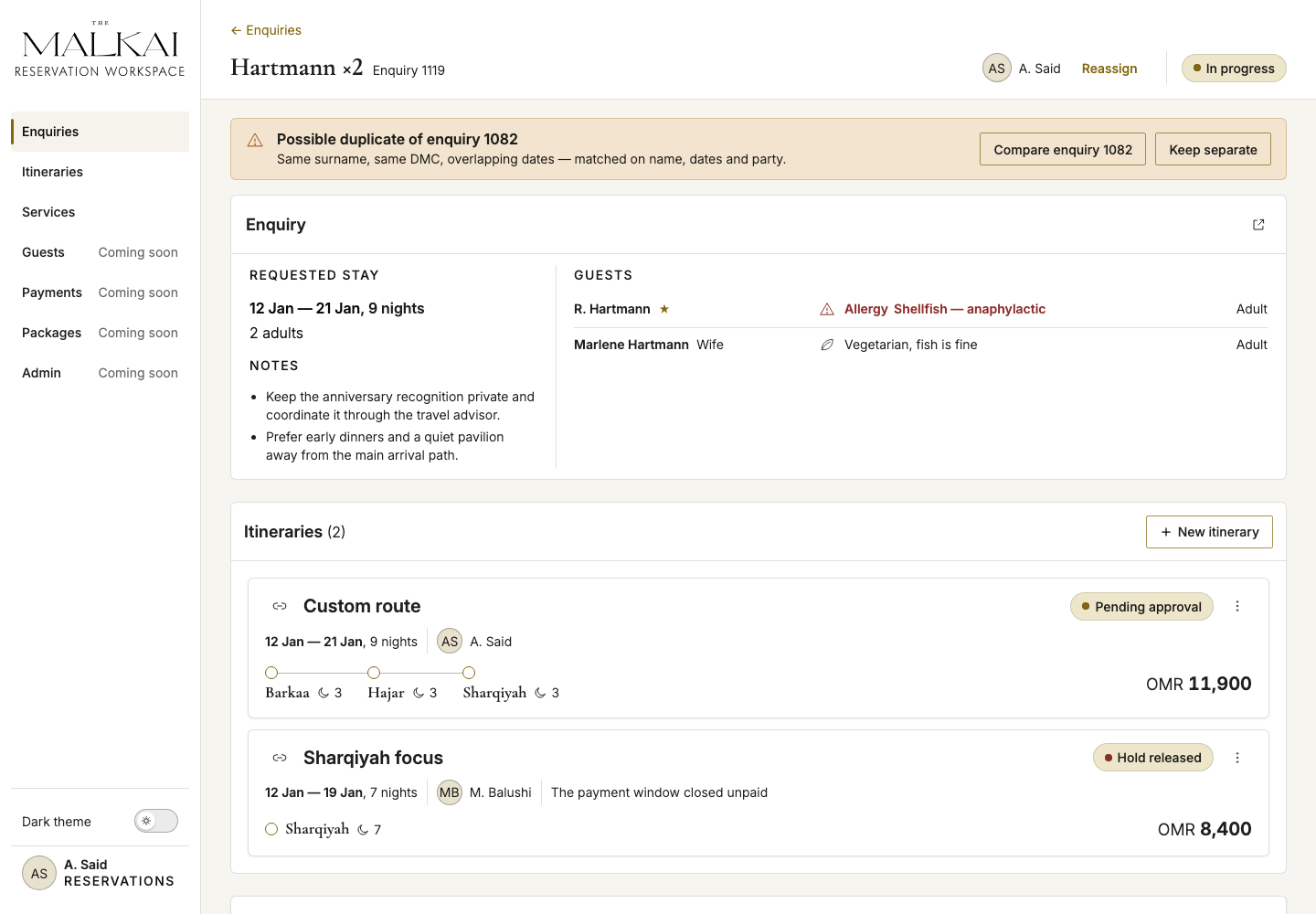
02 / Enquiry record
Understand the request
Guest needs, operational notes, risks, ownership, and related itinerary options meet in one working context.
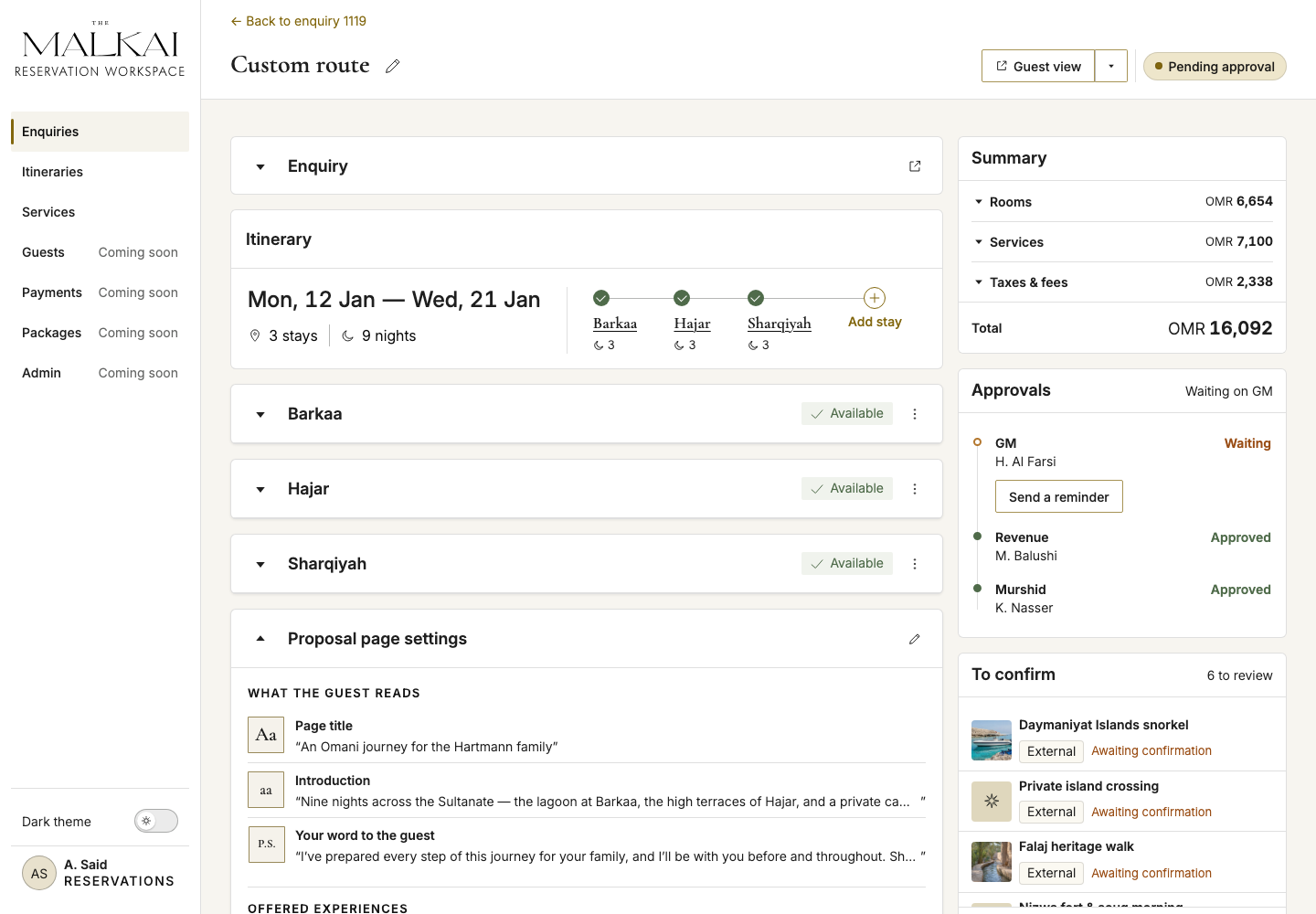
03 / Itinerary builder
Compose without losing context
The route, availability, approvals, guest-facing copy, and unresolved confirmations remain part of one composition surface.
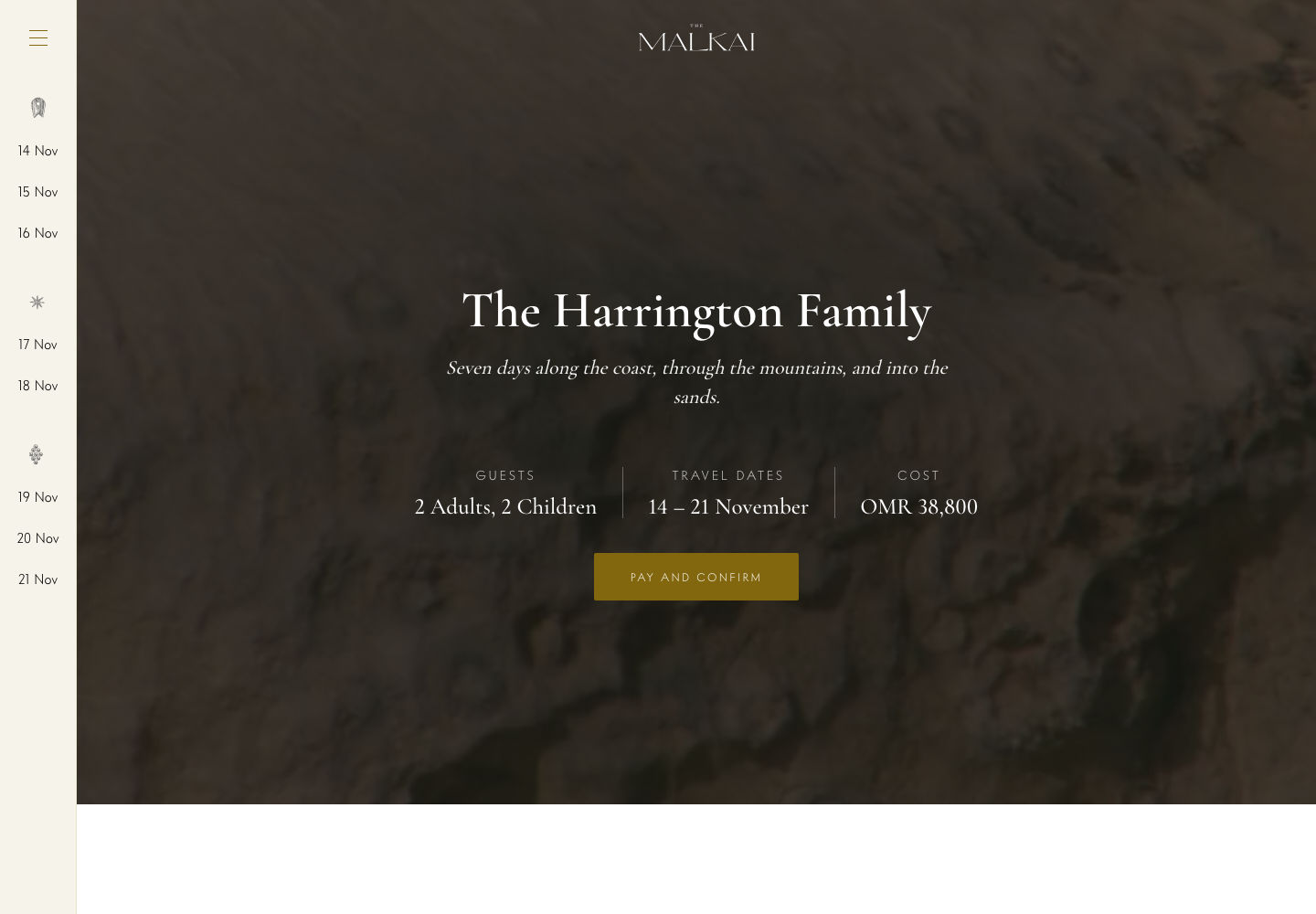
04 / Guest itinerary
Deliver only what belongs outside
The approved guest composition demonstrates the presentation and visibility rules with a separate static sample; it does not prove end-to-end data continuity.
Journey stages 04–05 , Journey Co-Design, Decision & Deposit
Decision 01
Make a dense queue actionable.
- Signal
- The day has no shape. “One day it can be very slow… another day it’s almost like you don’t have time to breathe.” Volume is unpredictable — a guess of five or ten a day, then fifty overnight — and the client refused to commit to a ceiling.
- Decision
- One home for every channel, with lifecycle, assignment, flags and itinerary counts readable in the row, so the next action is visible before a record is opened.
- Trade-off
- Density buys scanning power and spends it on rigour: typography, contrast, keyboard behaviour and a responsive fallback become part of the component contract, not a later pass.
- Still open
- The response promise is 2 hours in one client document and 5 in another. The queue shows the SLA; it does not hard-code the number.
Decision 02
Preserve context into composition.
- Signal
- Supplier responses are collected outside the platform. The agent needs to record them against the right service and retain that context when an itinerary changes.
- Decision
- Connect record, itinerary options and builder so the enquiry relationship stays visible through composition, and keep unresolved supplier work on the surface instead of in notes.
- Trade-off
- Context that appears twice needs a shared source model and explicit ownership, not independent copies that drift.
- Not yet designed
- The builder shows outstanding items within an itinerary. A follow-up history and a view across active itineraries remain opportunities to explore with agents.
Decision 03
Separate staff work from the guest experience.
Two faces of the itinerary share a journey, but not the same information. Visibility is a product rule, not a final layer of visual polish — and some of the rules are absolute: never a specific pavilion, never a map or a room number, never a guaranteed allocation. The guest surface carries none of the internal chains either: no states, no holds, no approvals, no freshness.
Decision 04
Take the workspace off the desk.
The general manager oversees all three properties and is rarely at a laptop. The Murshids are with guests through the stay. The client asked for the mid-office on their phones, as one web application rather than a native app. The prototype answers with a single responsive front end: the same screens and the same data, laid out three ways.
- Signal
- “He’s overseeing all three properties, so it’s gonna be mobile, traveling around.” Mobile access for the GM, the Murshids and the travelling leadership became an MVP requirement at the solution workshop.
- Decision
- One responsive web app, no separate mobile build. Tables become cards, filters move behind one button into a sheet, and an edit opens as its own page with Save under the thumb. The navigation follows the screen.
- Trade-off
- Every component carries three layouts and the phone’s own rules: targets a thumb can hit, nothing hidden behind hover, and a page that scrolls inside itself so Chrome on iOS keeps its toolbar and the tab bar stays on the bottom edge.
- Still open
- Which roles and tasks need the phone in the MVP is an open client question, and the working assumption keeps reservation agents at a desk. Tablets are our addition, not a requirement. The layouts were checked in Chrome on an iPhone and in emulation, not yet with the GM or the Murshids.
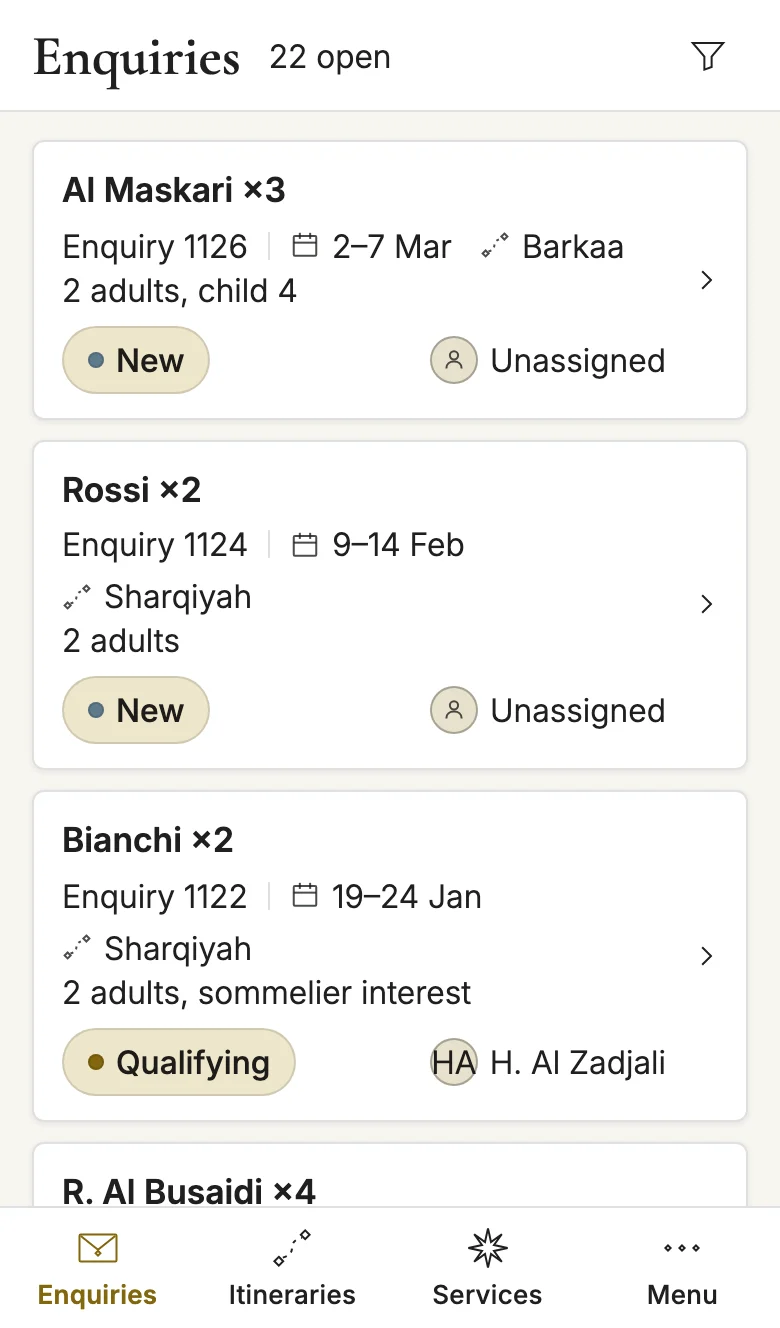
01 / Enquiry queue
The table becomes cards.
- On a desk
- A dense table, one row per enquiry, with lifecycle, owner, source, flags and itinerary count in its columns.
- On a phone
- One card per enquiry: the guest and party, the dates, the property, the status and the owner, with the whole card a target for the thumb.
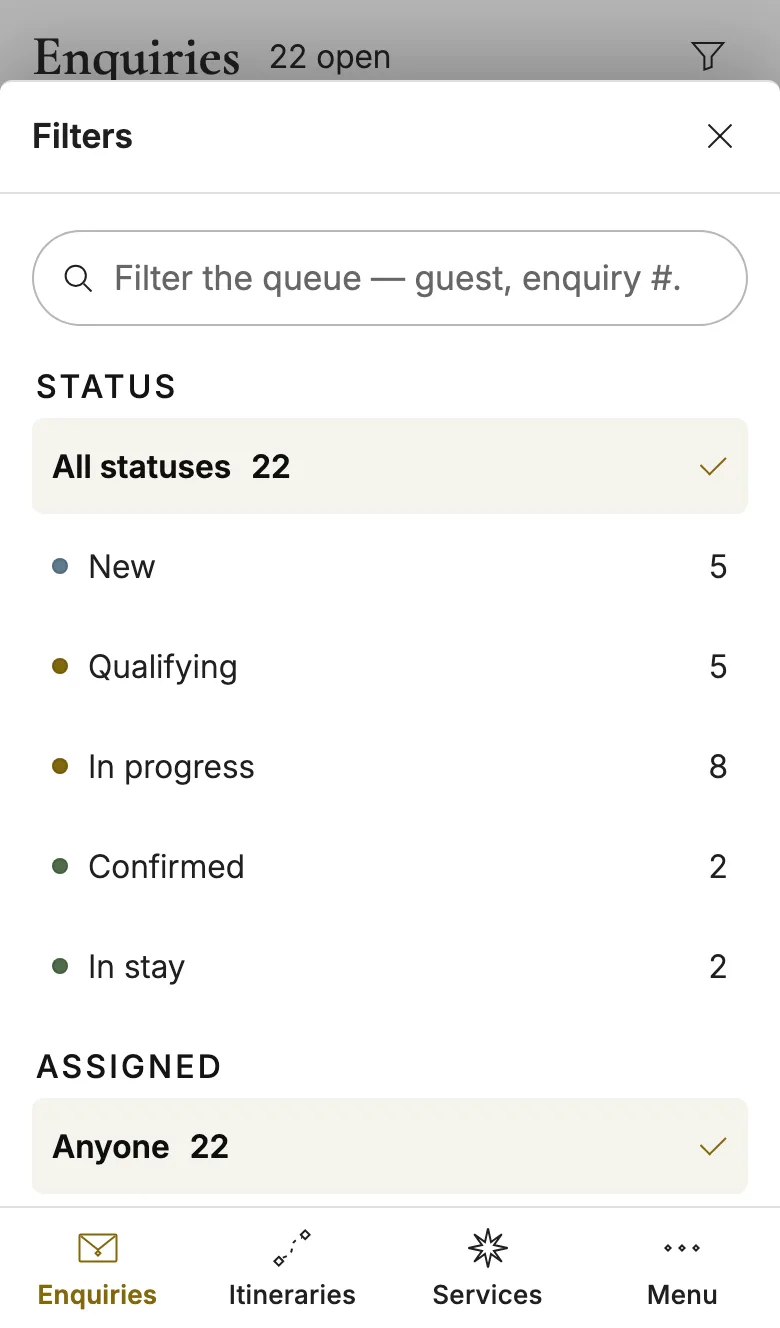
02 / Filters
Filters wait behind one button.
- On a desk
- The search owns a line above the table, and Status, Assigned, Source and the sort stand in a row of dropdowns under it.
- On a phone
- The funnel in the header opens a sheet with the same search, every facet with its counts, and the sort. Its badge says how many filters are on.
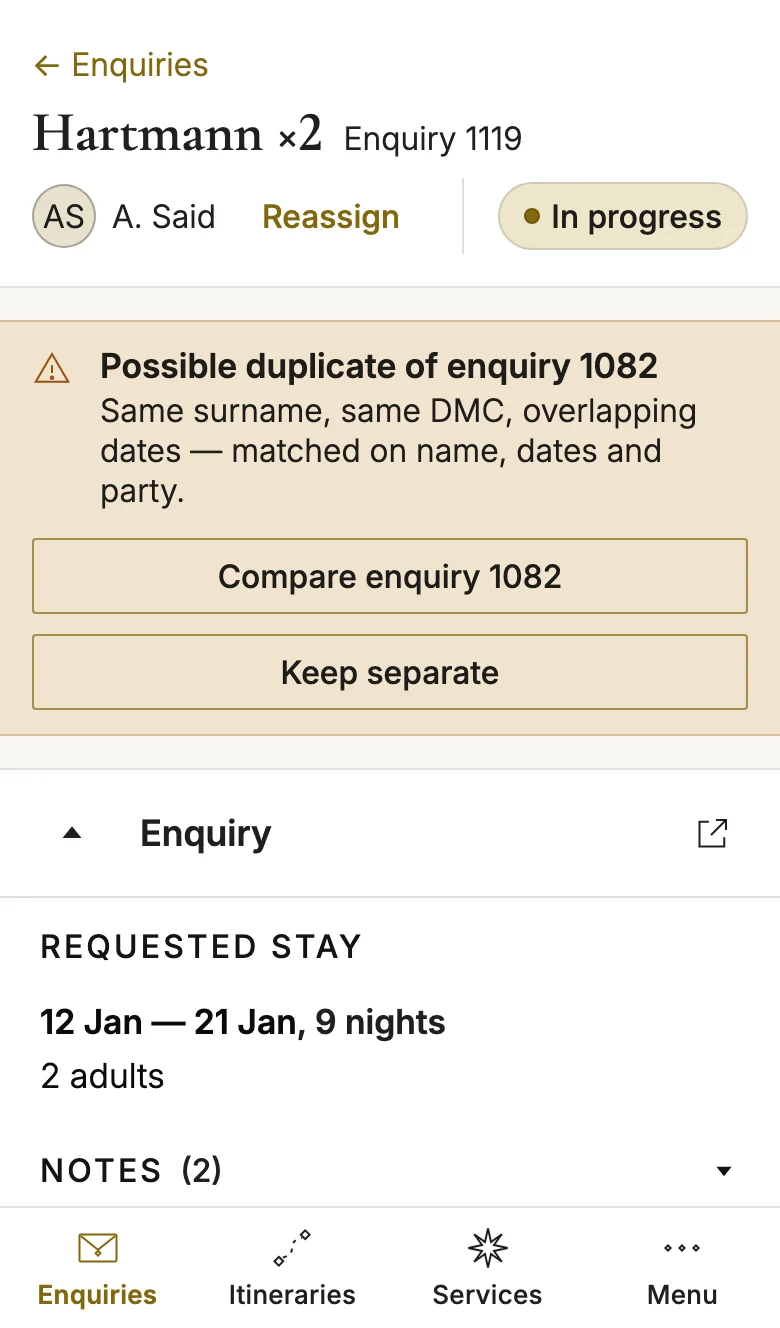
03 / Enquiry record
The record leads with who owns it.
- On a desk
- The owner and the status in the header, the duplicate warning across the page, the stay, notes and guests side by side, the itineraries below.
- On a phone
- The owner, the status and the duplicate warning stay above the fold, with full-width answers to the warning. The enquiry folds, and the notes open on request.
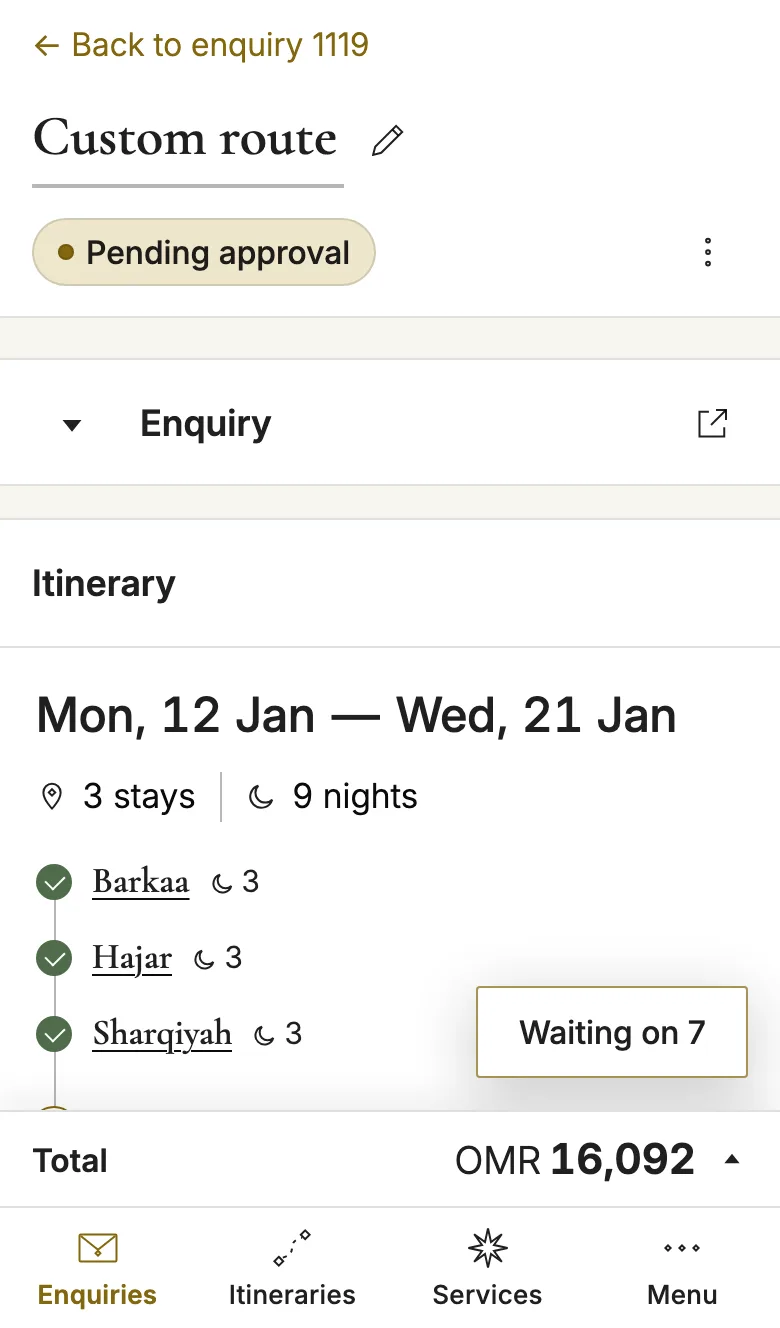
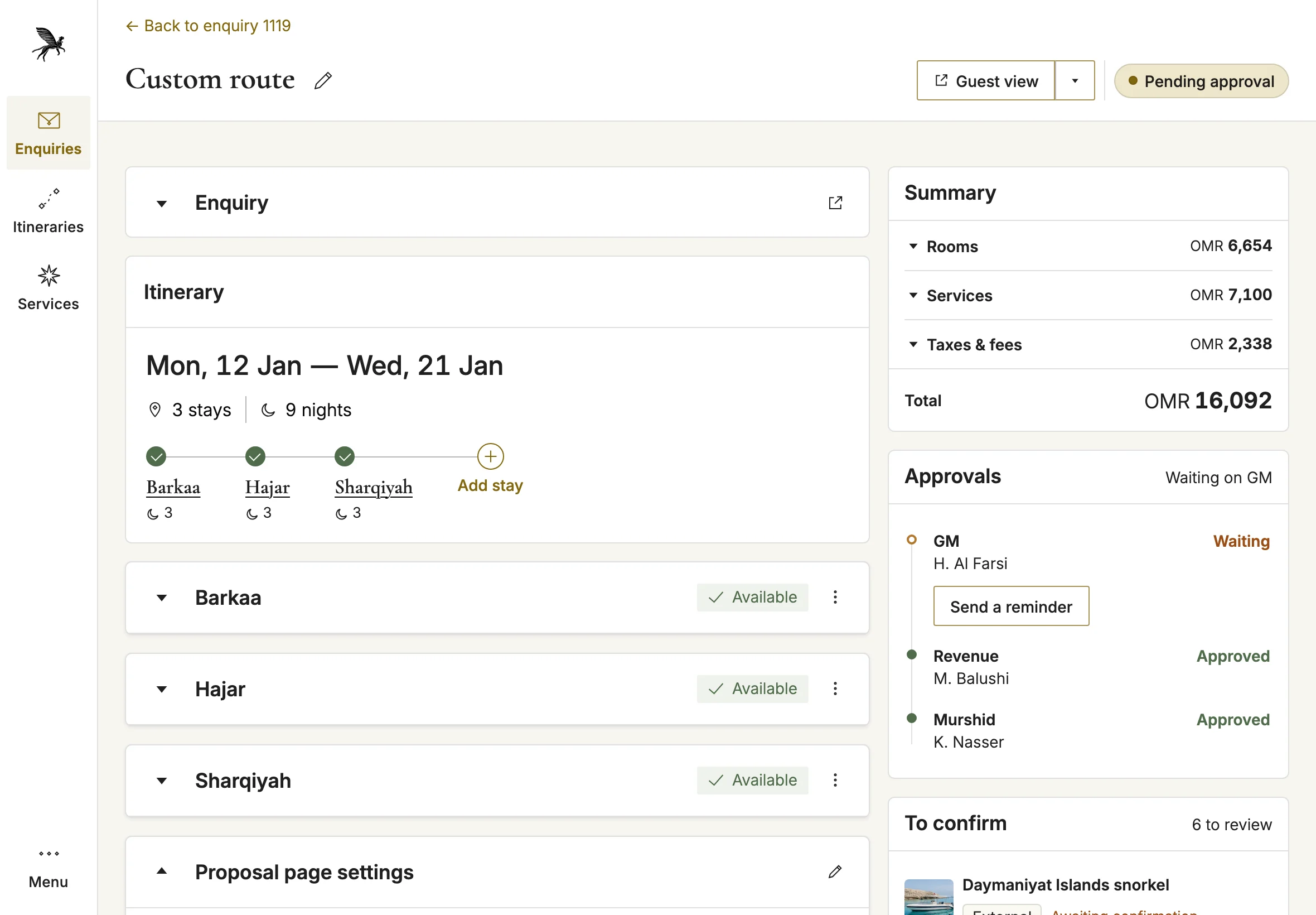
04 / Itinerary builder
The builder runs in one column.
- On a desk
- The route and the stays down the middle, with Summary, Approvals and To confirm in a column on the right.
- On a phone
- One column, with the route standing vertically. The total sits in a footer above the tab bar and opens the summary, and Waiting on floats above it with its count.
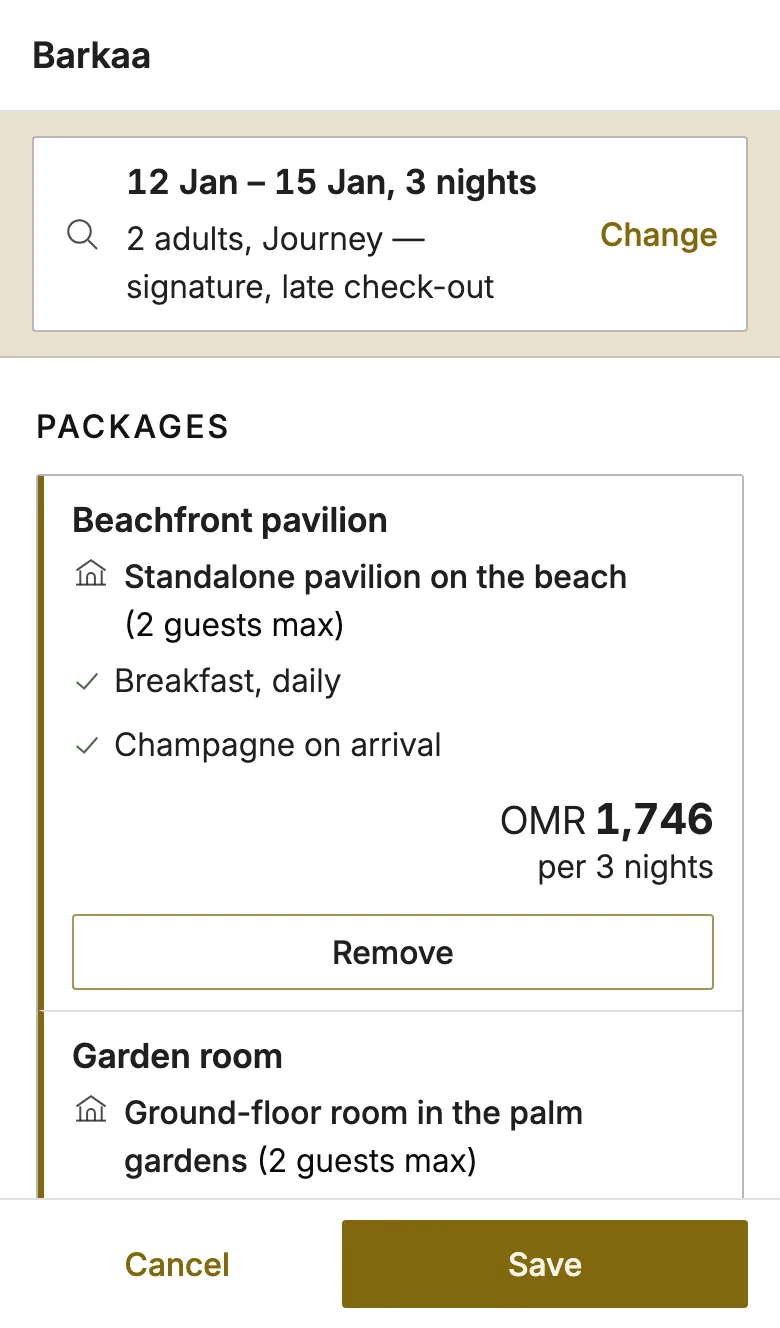
05 / Edit stay
An edit opens as its own page.
- On a desk
- The stay edits inside its own card on the canvas, with Cancel and Save in the card's header.
- On a phone
- A page of its own, the way a hotel page works on a phone: the dates and party fold into one bar with Change, the packages follow, and Cancel and Save sit under the thumb.
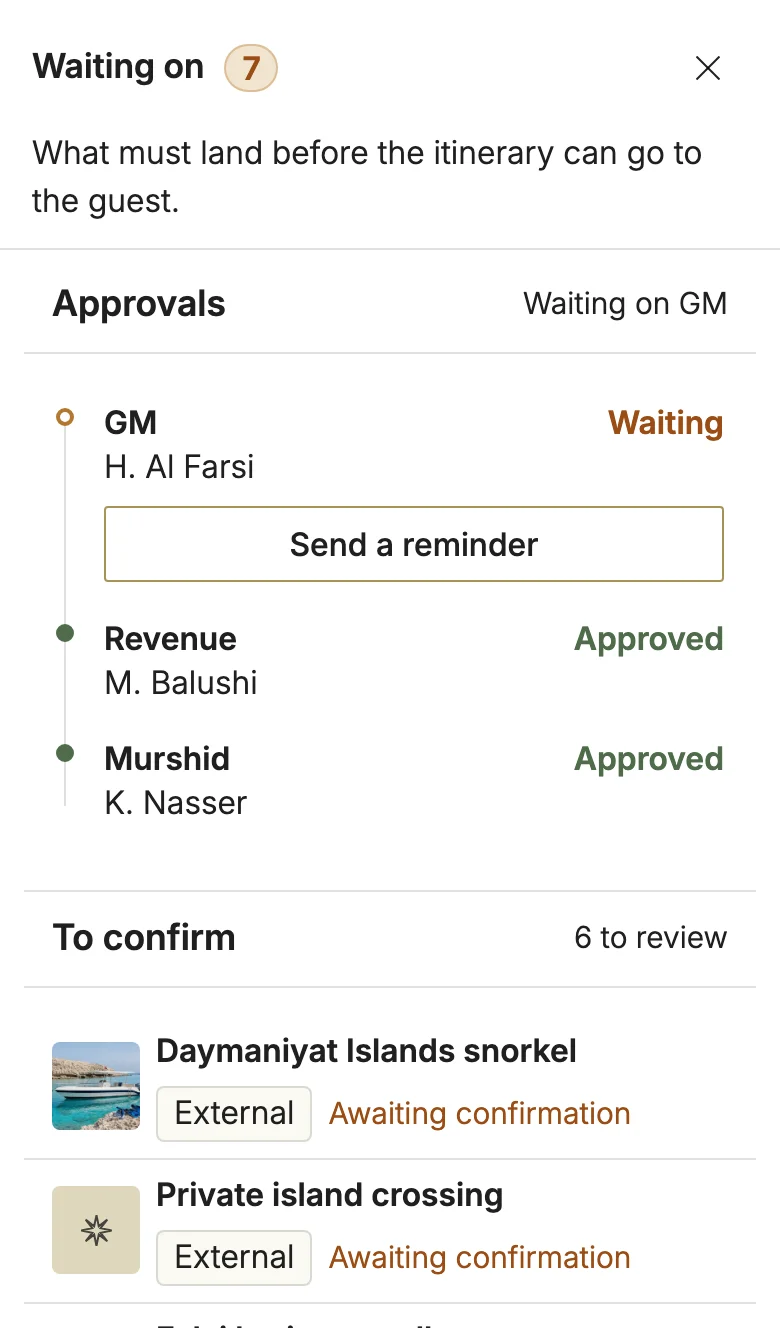
06 / Waiting on
What blocks sending, on one page.
- On a desk
- Approvals and To confirm stay in view beside the route the whole time.
- On a phone
- The Waiting on button opens them as a page from the right: who still has to approve, a reminder one tap away, and the services still to confirm.
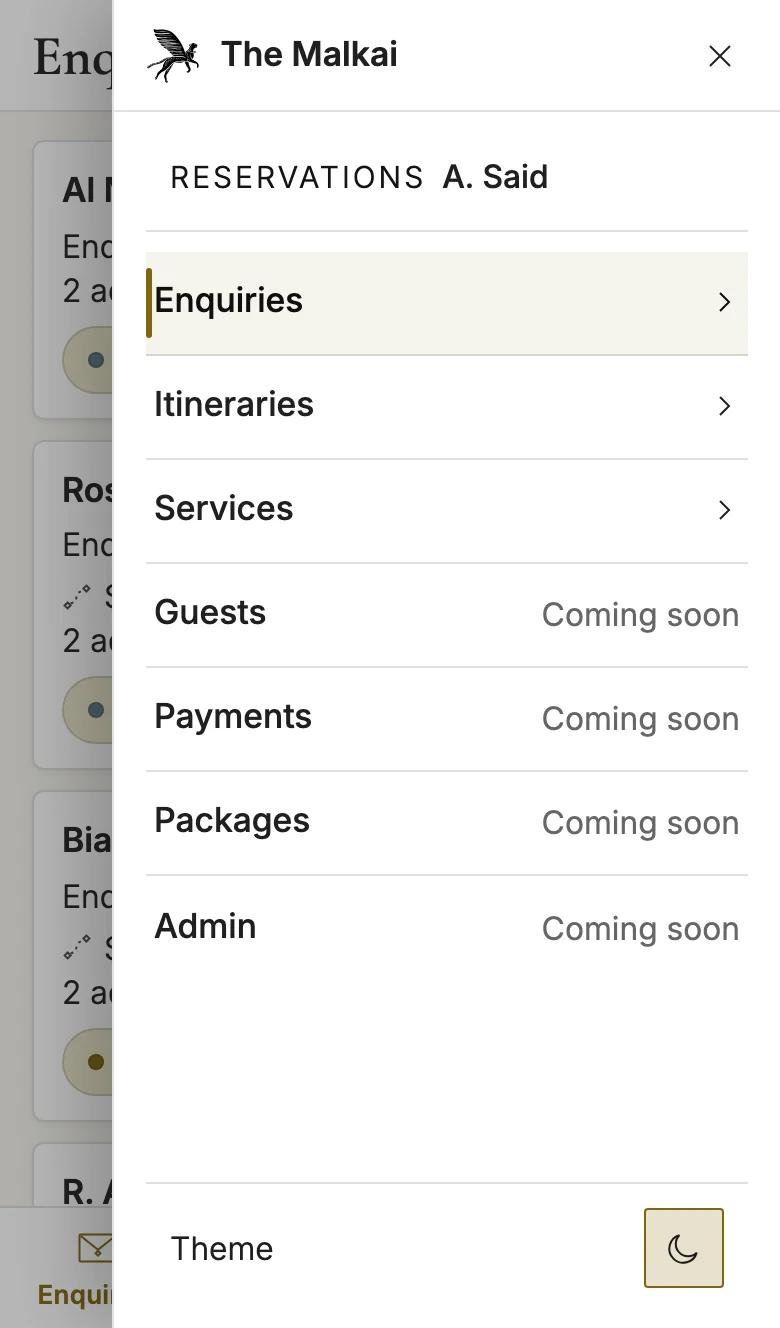
07 / Menu
The navigation follows the screen.
- On a desk
- A sidebar with every section, the theme switch and the signed-in user.
- On a phone
- A tab bar for Enquiries, Itineraries and Services. Menu, at its end, slides in from the right edge with the whole navigation and the theme switch.
One workspace, three layouts
- Phone, under 768 px
- A tab bar along the bottom for Enquiries, Itineraries and Services. Everything else is in a menu that slides in from the right.
- Tablet, 768 to 1199 px
- The tab bar stands up as a rail on the left edge, and the menu opens beside it.
- Desk, 1200 px and wider
- The sidebar and the dense table the rest of this case shows.
The design system
One system. Clear meaning at every step.
A room booked by the PMS and an experience confirmed by phone are different kinds of certainty. The design system makes that difference visible — then carries the same rules through colour, typography and the working interface.
Make certainty legible
The source of a claim is part of its visual identity.
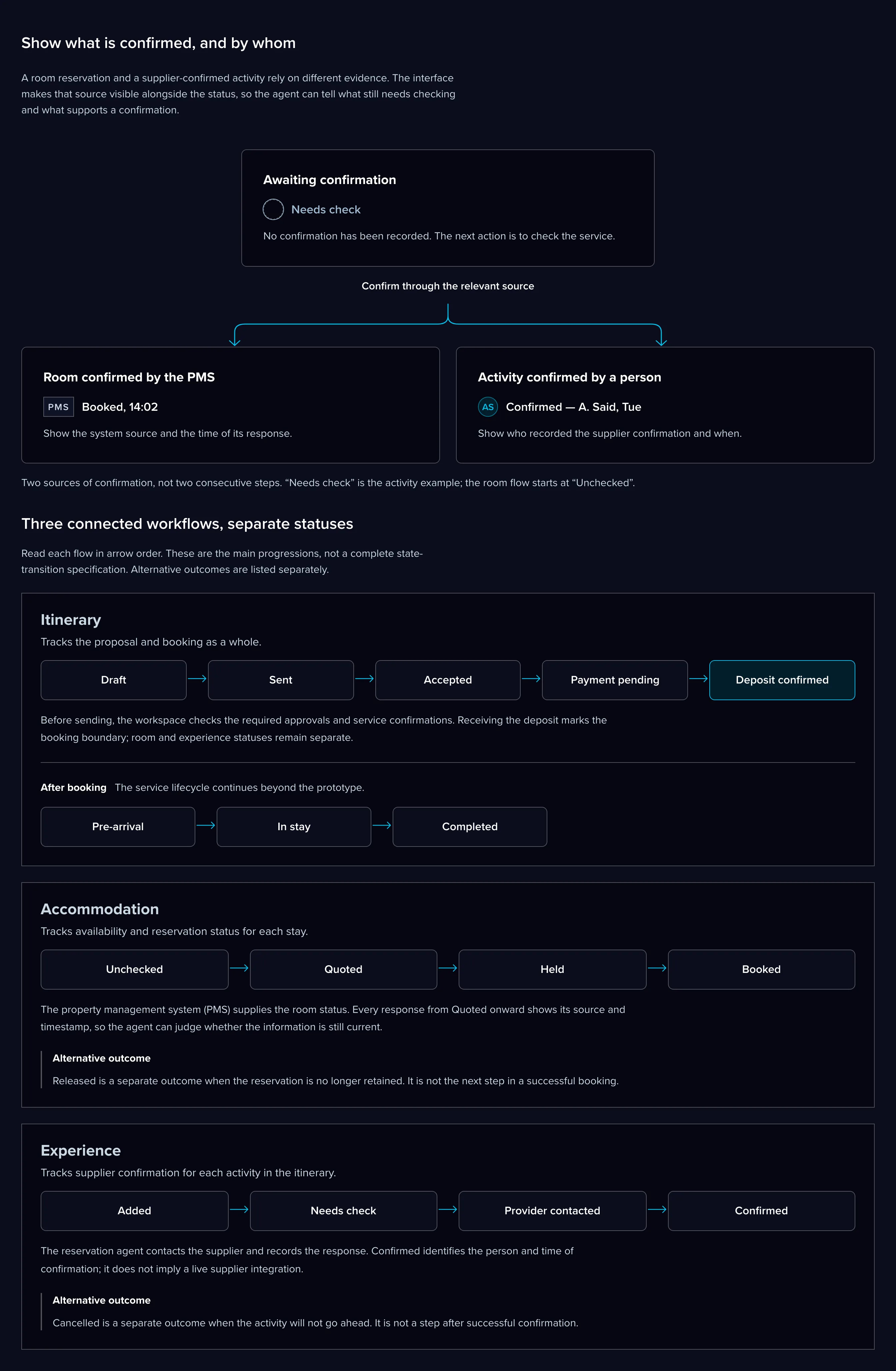
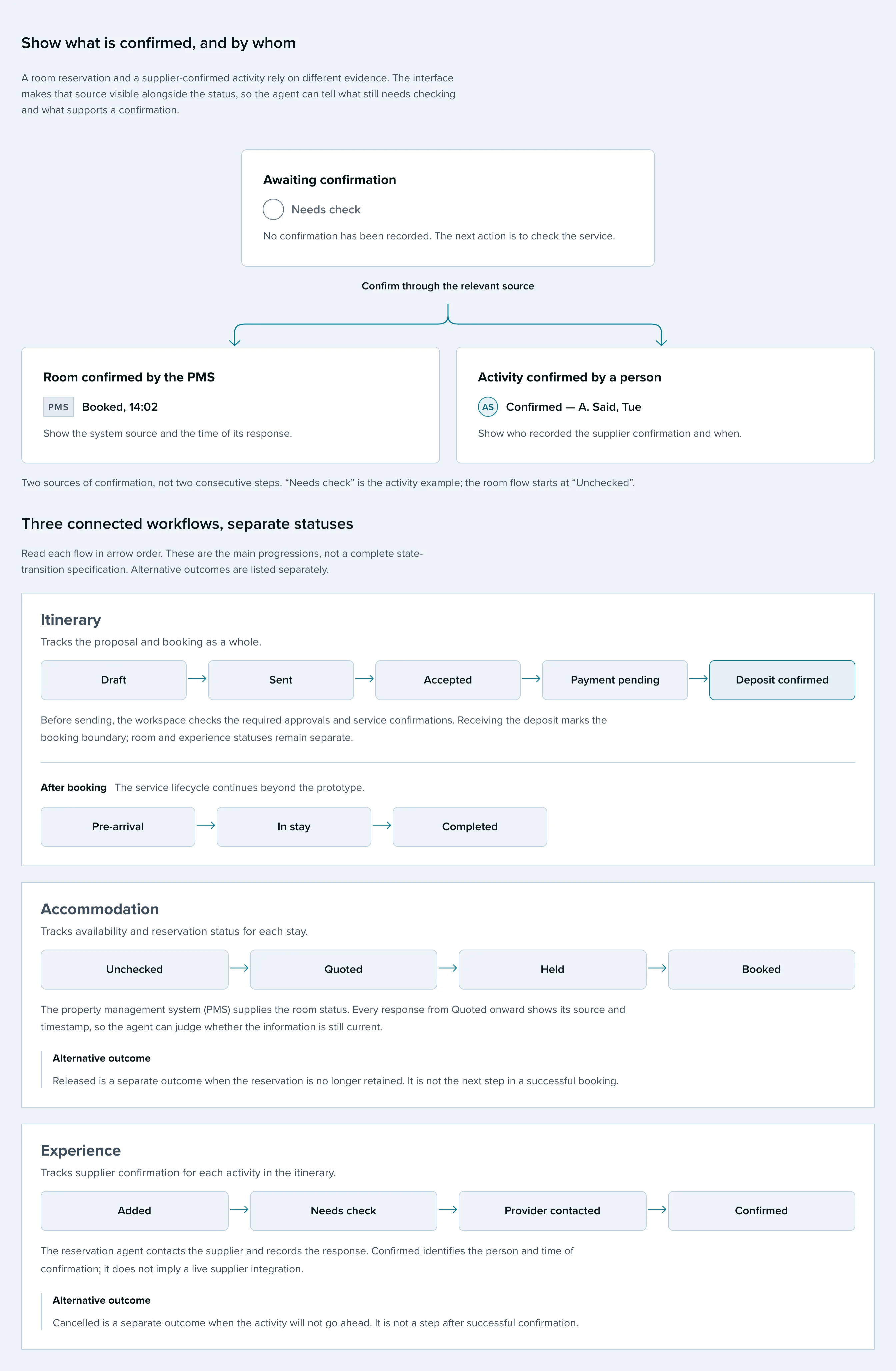
Show what is confirmed, and by whom
A room reservation and a supplier-confirmed activity rely on different evidence. The interface makes that source visible alongside the status, so the agent can tell what still needs checking and what supports a confirmation.
Awaiting confirmation
Needs check
No confirmation has been recorded. The next action is to check the service.
Confirm through the relevant source
Room confirmed by the PMS
PMS Booked, 14:02
Show the system source and the time of its response.
Activity confirmed by a person
AS Confirmed — A. Said, Tue
Show who recorded the supplier confirmation and when.
Three connected workflows, separate statuses
Read each flow in arrow order. These are the main progressions, not a complete state-transition specification. Alternative outcomes are listed separately.
Itinerary
Tracks the proposal and booking as a whole.
- Draft
- Sent
- Accepted
- Payment pending
- Deposit confirmed
Before sending, the workspace checks the required approvals and service confirmations. Receiving the deposit marks the booking boundary; room and experience statuses remain separate.
After booking The service lifecycle continues beyond the prototype.
- Pre-arrival
- In stay
- Completed
Accommodation
Tracks availability and reservation status for each stay.
- Unchecked
- Quoted
- Held
- Booked
The property management system (PMS) supplies the room status. Every response from Quoted onward shows its source and timestamp, so the agent can judge whether the information is still current.
Alternative outcome Released is a separate outcome when the reservation is no longer retained. It is not the next step in a successful booking.
Experience
Tracks supplier confirmation for each activity in the itinerary.
- Added
- Needs check
- Provider contacted
- Confirmed
The reservation agent contacts the supplier and records the response. Confirmed identifies the person and time of confirmation; it does not imply a live supplier integration.
Alternative outcome Cancelled is a separate outcome when the activity will not go ahead. It is not a step after successful confirmation.
Give every token a job
A visual language built around readability, surface and responsibility.
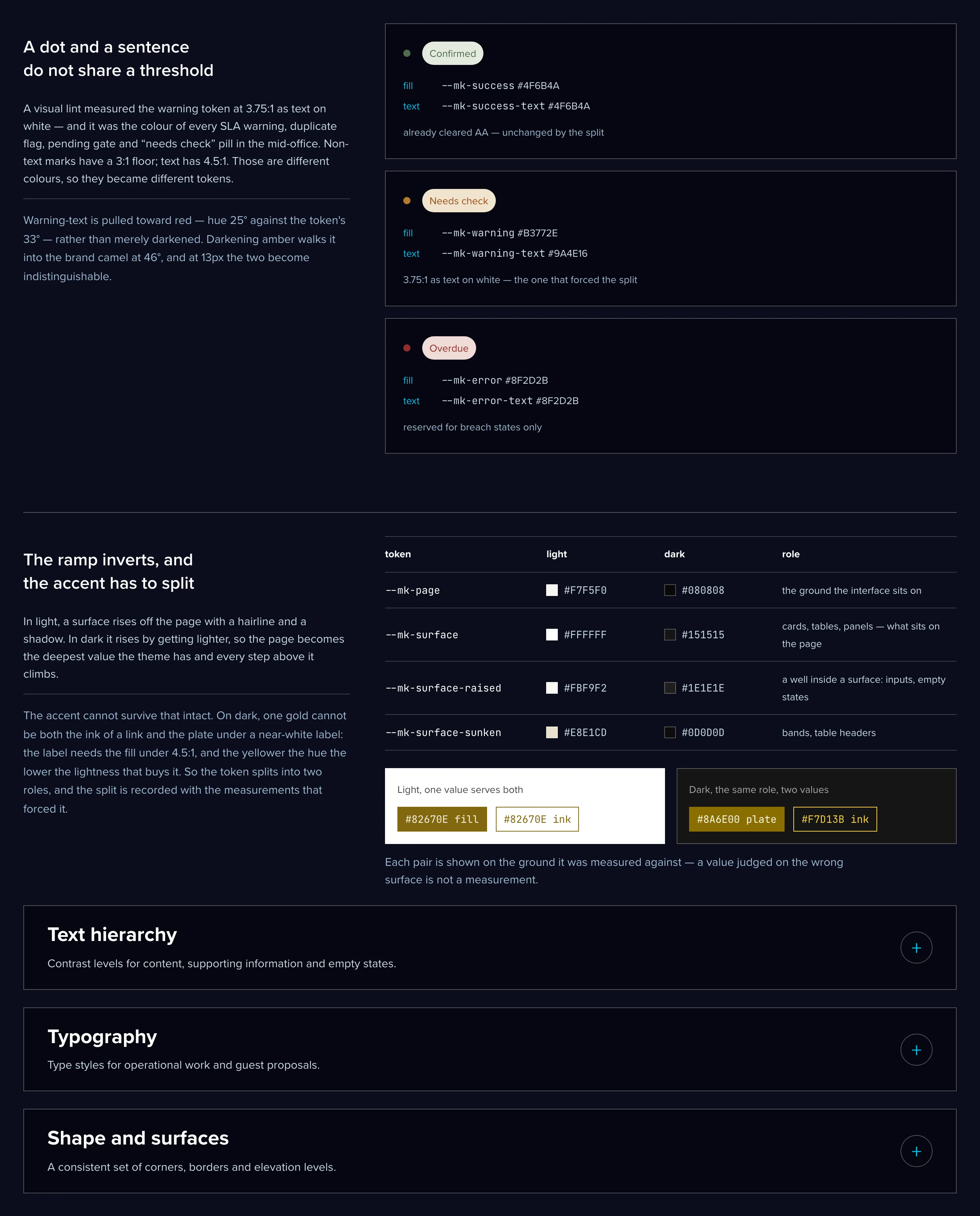
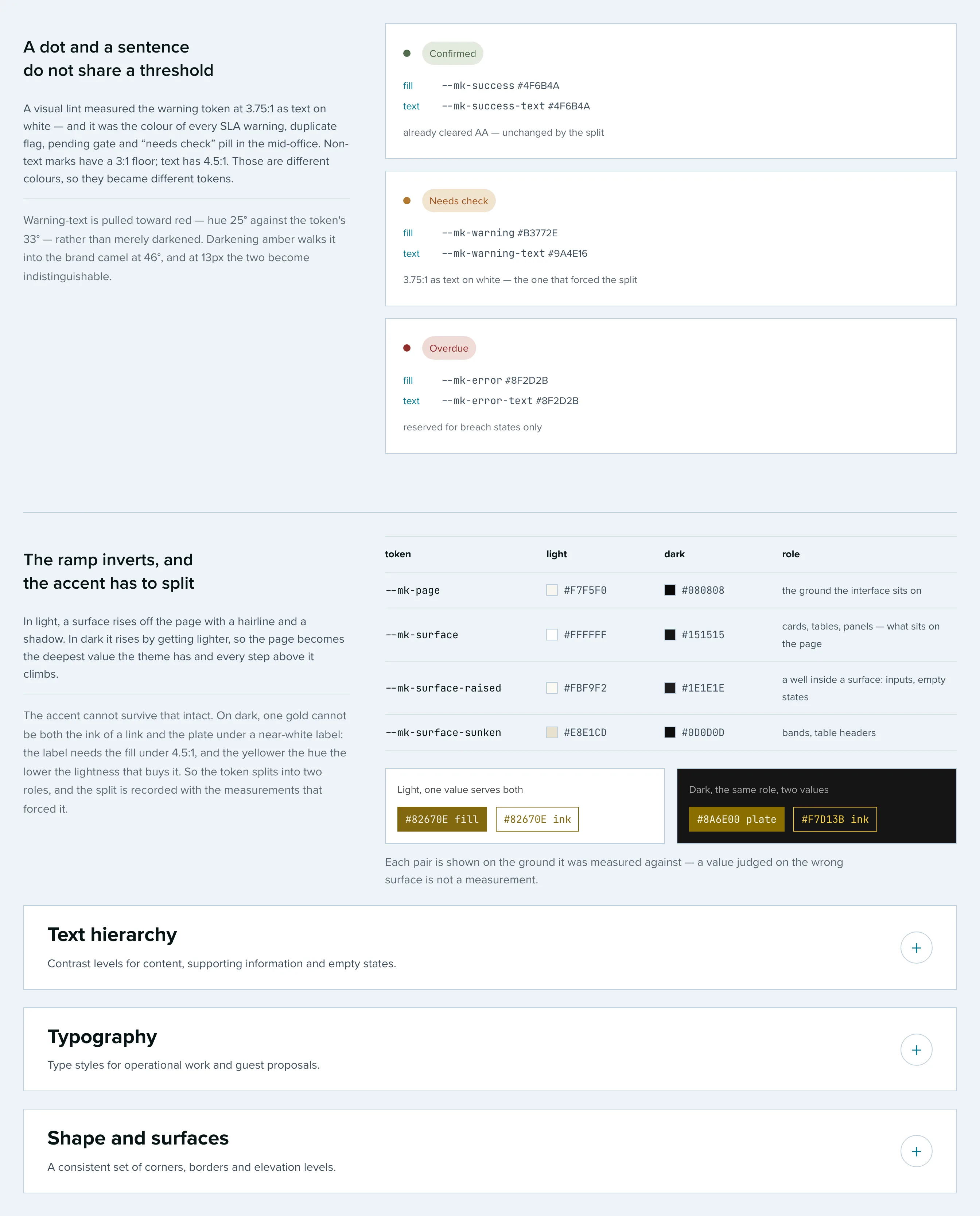
A dot and a sentence do not share a threshold
A visual lint measured the warning token at 3.75:1 as text on white — and it was the colour of every SLA warning, duplicate flag, pending gate and “needs check” pill in the mid-office. Non-text marks have a 3:1 floor; text has 4.5:1. Those are different colours, so they became different tokens.
Warning-text is pulled toward red — hue 25° against the token's 33° — rather than merely darkened. Darkening amber walks it into the brand camel at 46°, and at 13px the two become indistinguishable.
- Confirmed
- fill
--mk-success#4F6B4A- text
--mk-success-text#4F6B4A
already cleared AA — unchanged by the split
- Needs check
- fill
--mk-warning#B3772E- text
--mk-warning-text#9A4E16
3.75:1 as text on white — the one that forced the split
- Overdue
- fill
--mk-error#8F2D2B- text
--mk-error-text#8F2D2B
reserved for breach states only
The ramp inverts, and the accent has to split
In light, a surface rises off the page with a hairline and a shadow. In dark it rises by getting lighter, so the page becomes the deepest value the theme has and every step above it climbs.
The accent cannot survive that intact. On dark, one gold cannot be both the ink of a link and the plate under a near-white label: the label needs the fill under 4.5:1, and the yellower the hue the lower the lightness that buys it. So the token splits into two roles, and the split is recorded with the measurements that forced it.
--mk-page #F7F5F0 #080808 the ground the interface sits on --mk-surface #FFFFFF #151515 cards, tables, panels — what sits on the page --mk-surface-raised #FBF9F2 #1E1E1E a well inside a surface: inputs, empty states --mk-surface-sunken #E8E1CD #0D0D0D bands, table headers Light, one value serves both
#82670E fill #82670E inkDark, the same role, two values
#8A6E00 plate #F7D13B inkEach pair is shown on the ground it was measured against — a value judged on the wrong surface is not a measurement.
Text hierarchyContrast levels for content, supporting information and empty states.
Named registers, not opacity by feel
Five rungs, each with a job. The distinction that matters is not decorative: the body states what is; quiet states what is not there. “No services added yet” must not read with the weight of a fact — and a date, a subline or a hint that carries information is body, however secondary it feels.
-
Base
#000000Not a text voice. The base every register derives from — the greys are alphas of it.
-
Body
rgba(0,0,0,0.88)The workspace default, and the single most-set colour in it. States what is.
-
Quiet
rgba(29,31,29,0.68)Absence only: an empty state, a placeholder, a thing not added yet. States what is not there.
-
Meta
rgba(0,0,0,0.72)A timestamp, a count, a provenance line. Secondary to its sentence, and not an absence.
-
Label
rgba(0,0,0,0.92)The caps subtitle, and nothing else. Capitals lay less ink down, so they need more of it.
TypographyType styles for operational work and guest proposals.
Tokens named for the surface that owns them
Not for the typeface that happens to fill them. That is what makes a customer-facing face leaking into the mid-office a detectable error rather than an accident, and what lets the mid-office face change without touching a single call site. The linter enforces it in both directions.
-
--mk-font-brand-serifCormorant GaramondOne decorative title at the top of a page, plus guest editorial copy.
-
--mk-font-appInterThe dense operational UI: tables, forms, meta. Body weight 350.
-
--mk-font-app-capsInterMid-office letter-spaced caps micro-labels, tracking .1em.
-
--mk-font-guest-capsIntervogueCustomer-facing caps only. A mid-office file may not reference it — the linter enforces that.
Type scale
Token sizes in pixels. Samples below are enlarged where needed for readability.
- Aa
13 - Aa
14 - Aa
16 - Aa
18 - Aa
20 - Aa
24 - Aa
28 - Aa
36
Body sits at 14 and at weight 350. A price is a type pair: the currency derives
its size from its own figure — max(13px, calc(1em - 2px)) — so it
lands on 13, 14, 16 or 18 and never asks a token.
Shape and surfacesA consistent set of corners, borders and elevation levels.
Three radii, two elevations, one border law
Editorial print, not glossy SaaS. Controls take 2px, a dense card riding in a band takes 4, full containers take 6. A card carries a 1px shadow; a dialog floats over a scrim and carries the only step above it — and there is deliberately no third.
--mk-radius-sm2px, controls--mk-radius-compact4px, dense cards--mk-radius-md6px, containers
- hairline
- The quiet line: separators inside a surface. Too faint to hold a frame.
- hairline-mid
- The card dress — the one frame every container wears.
- hairline-strong
- The drawn edge of an instrument: controls, menus, popovers, dialogs.
- hairline-dash
- The ink of every dash and rail. It overshoots strong, because a 3-on-2 dash lays ink on only 60% of its length.
Show the system at work
Inspect the catalogue, its structural checks and the reviewed interface examples.
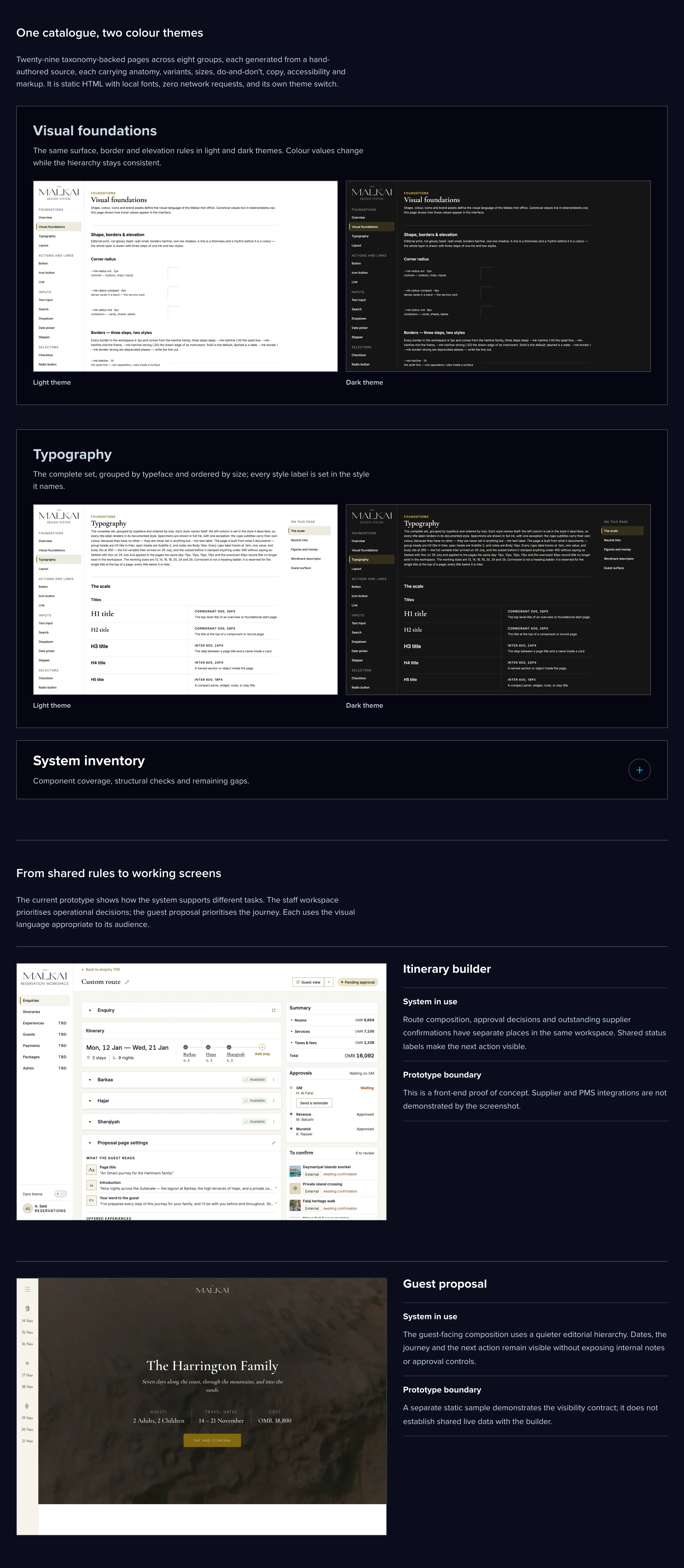
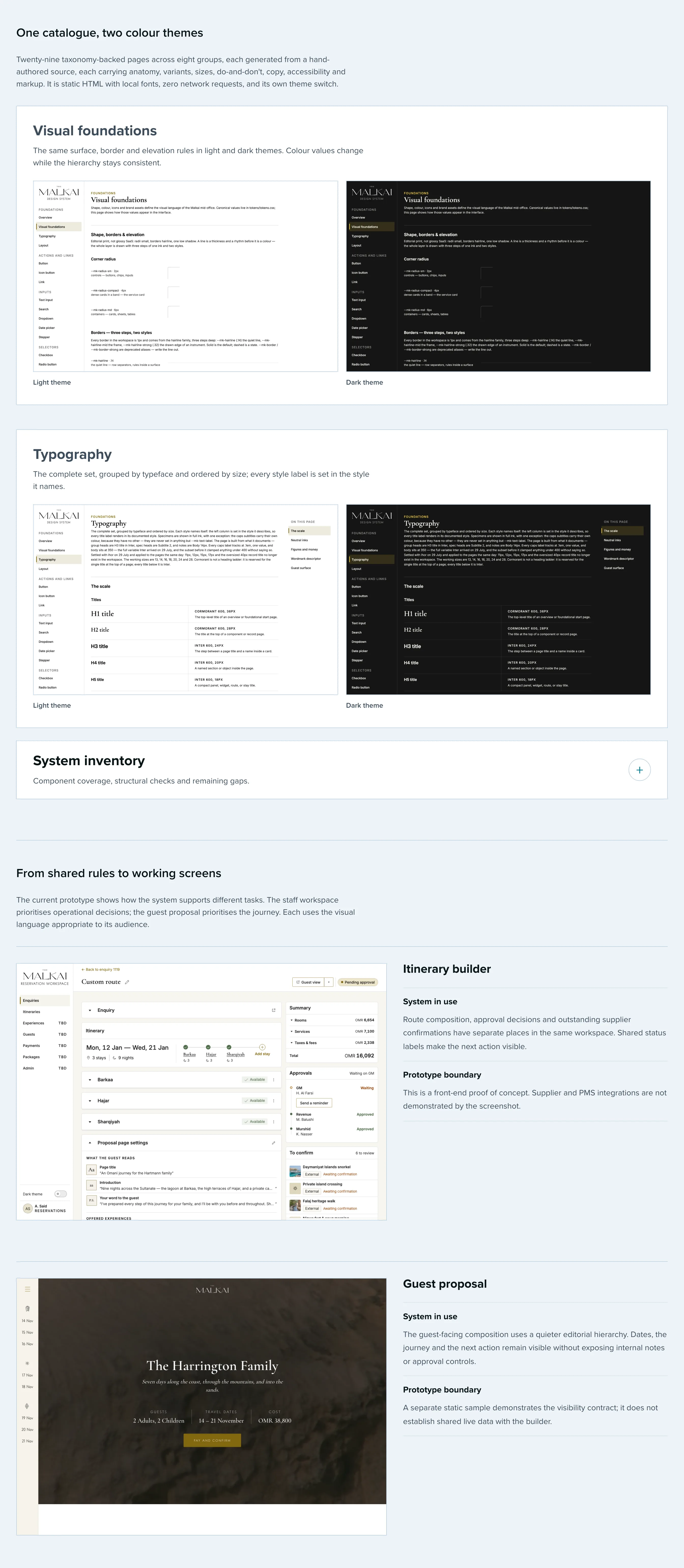
One catalogue, two colour themes
Twenty-nine taxonomy-backed pages across eight groups, each generated from a hand-authored source, each carrying anatomy, variants, sizes, do-and-don't, copy, accessibility and markup. It is static HTML with local fonts, zero network requests, and its own theme switch.
-
Visual foundations
The same surface, border and elevation rules in light and dark themes. Colour values change while the hierarchy stays consistent.
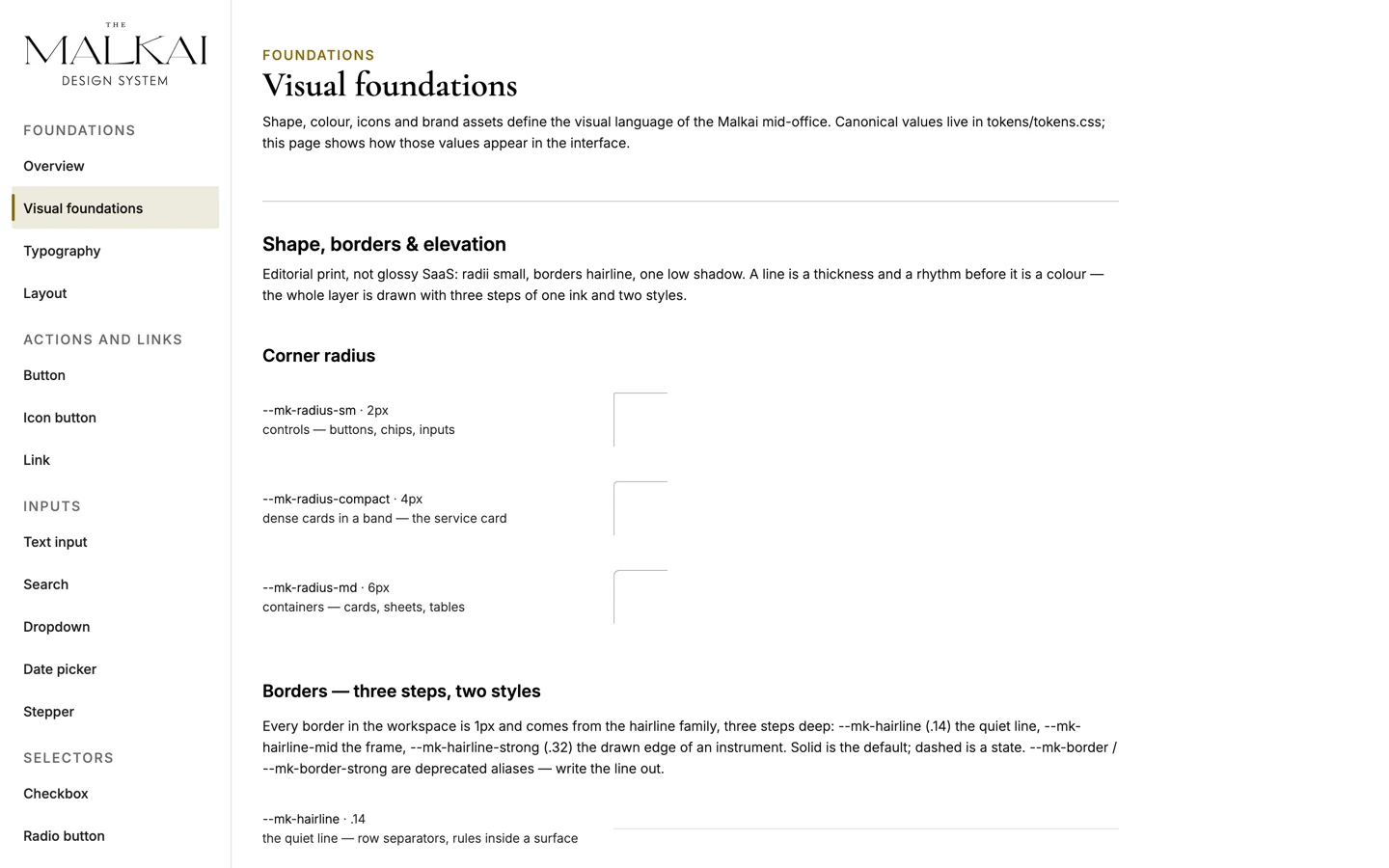
Light theme 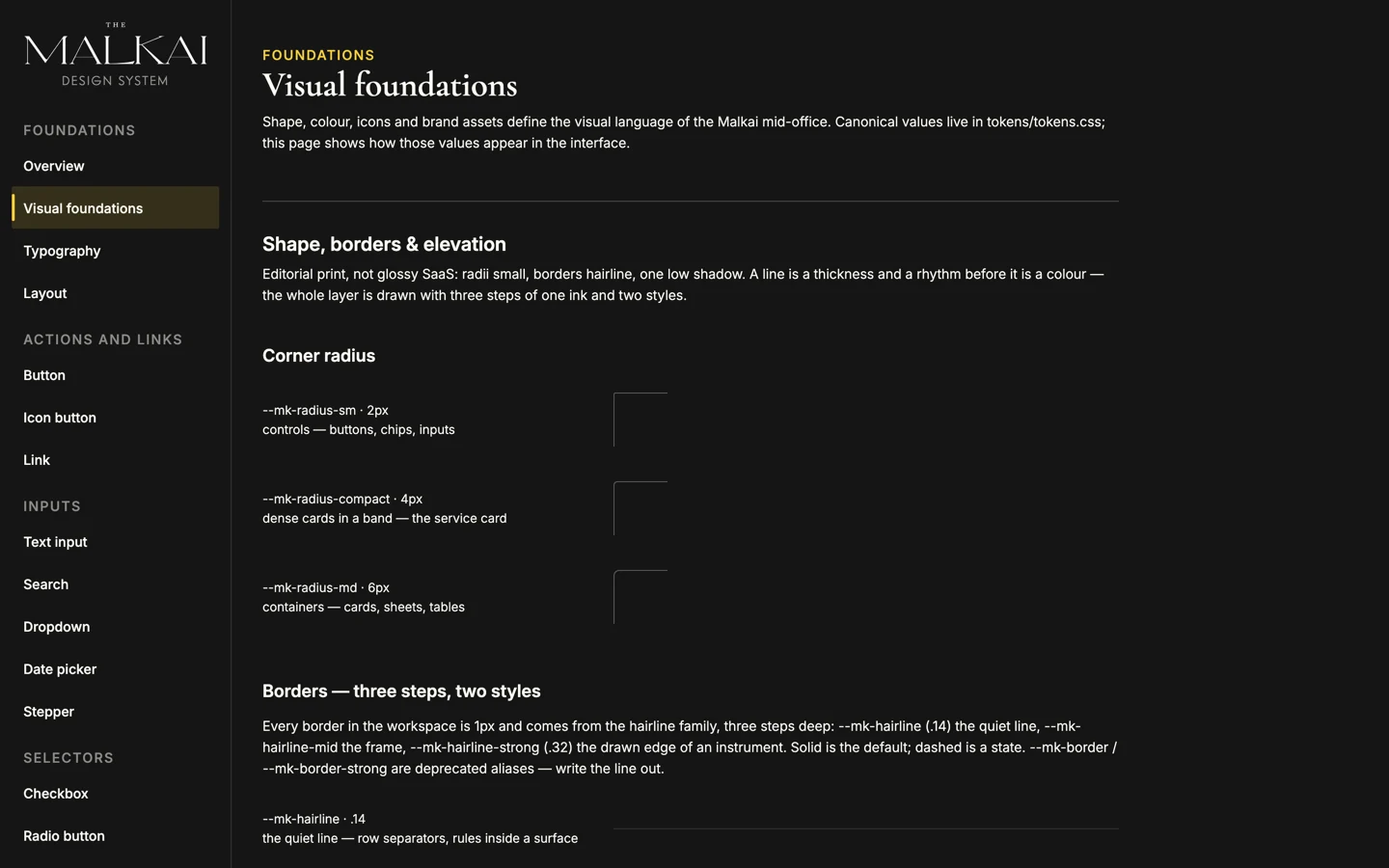
Dark theme -
Typography
The complete set, grouped by typeface and ordered by size; every style label is set in the style it names.
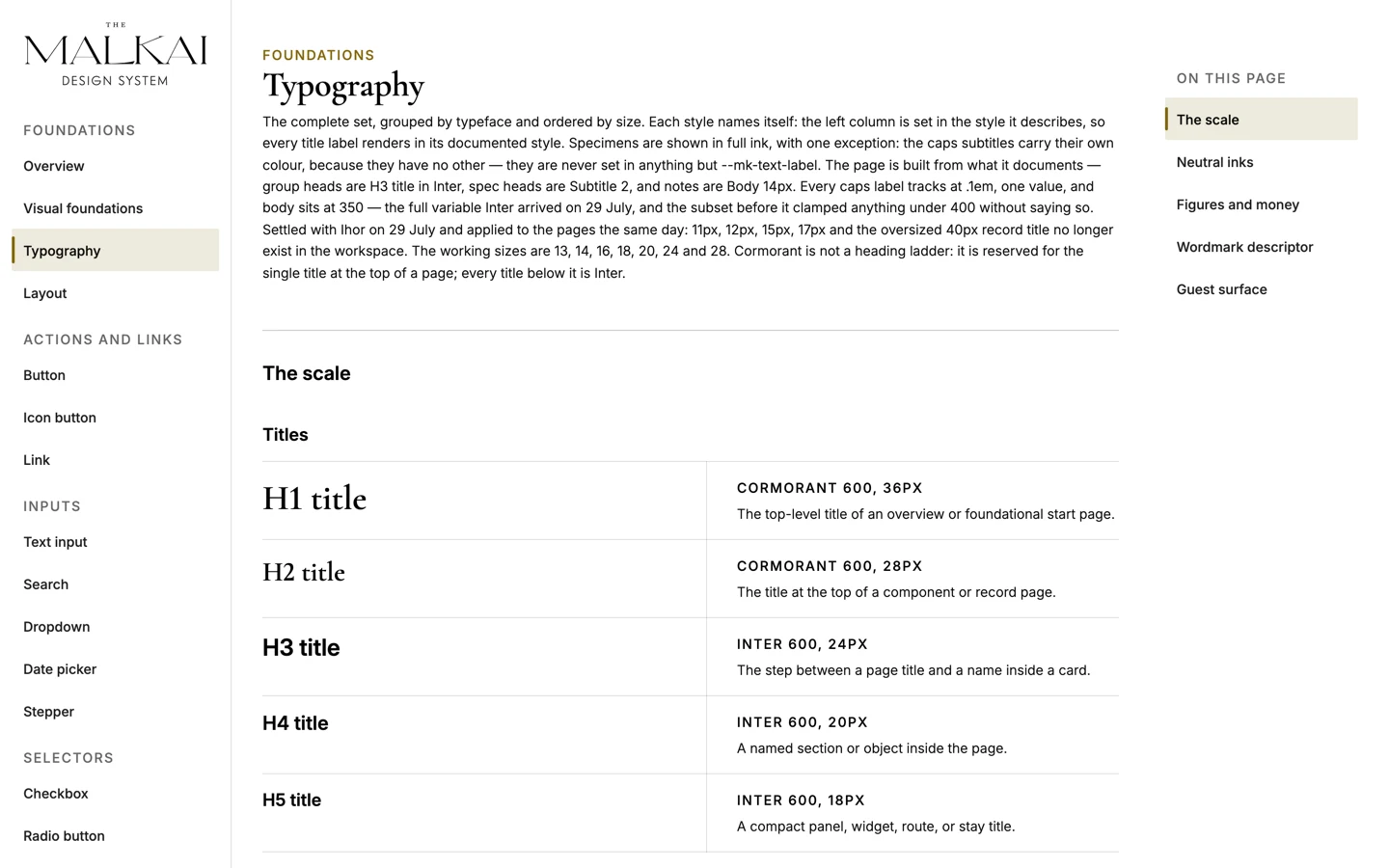
Light theme 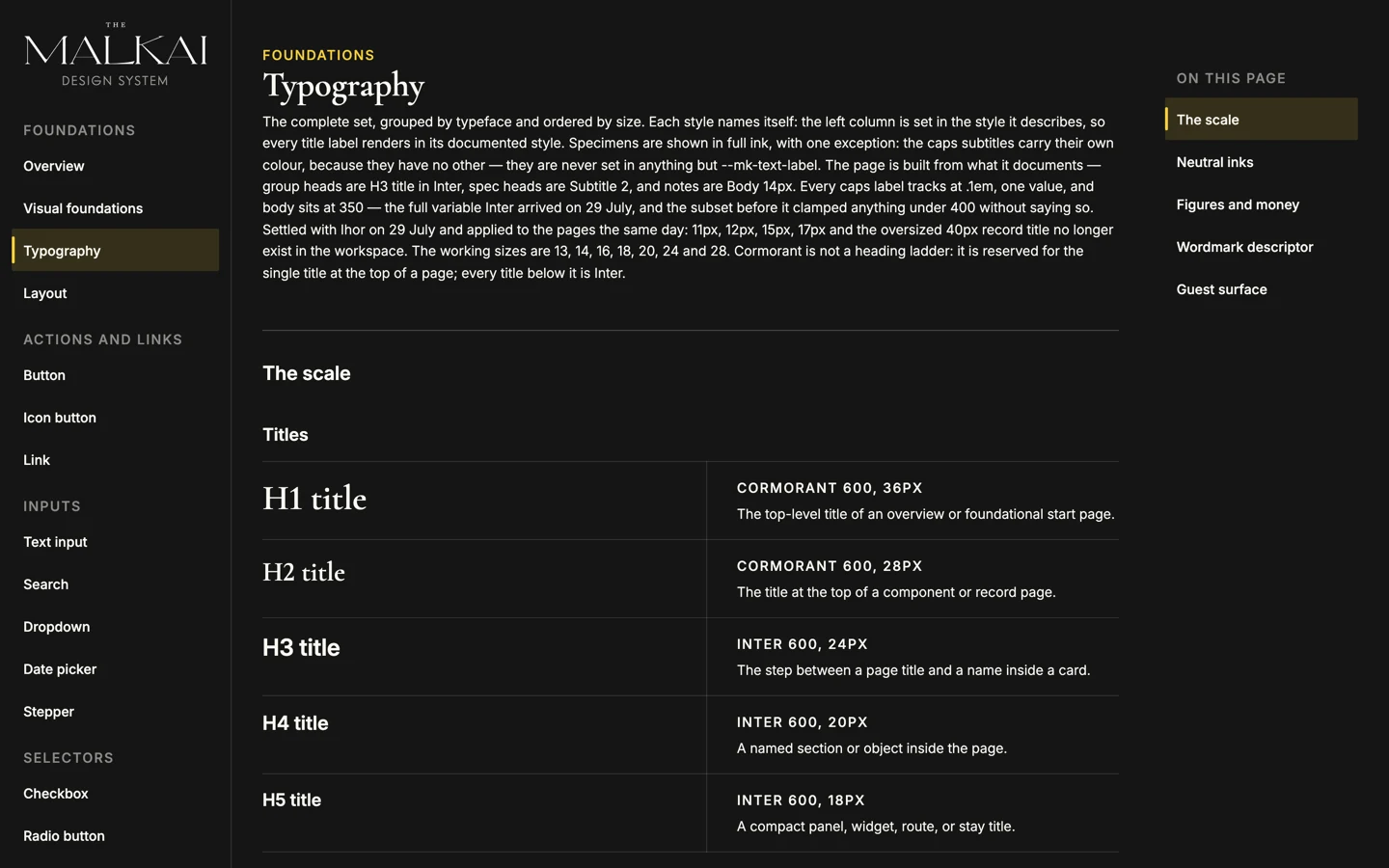
Dark theme
System inventoryComponent coverage, structural checks and remaining gaps.
The numbers are machine-generated
The inventory is regenerated by a script and the file says, in its own header, never to hand-edit it. That is the point: a component grid can be arranged to look complete. A registry that counts its own unresolved references cannot.
- 156tokens
- 29catalogue pages
- 8groups
- 57closed-vocabulary rows
- 314runtime classes
- 9prototype pages consuming the layer
| Manifest names without a runtime definition | 0 |
|---|---|
| Catalogue names without a runtime definition | 0 |
| Catalogue pages missing meta, body or generated output | 0 |
| Unresolved references in current prototypes | 0 |
| Local classes defined in three or more files | 0 |
| Runtime classes without a manifest owner | 84 |
Five of the six are zero. The one that is not is reported honestly as a request for ownership — often satellites and state hooks — rather than suppressed.
From shared rules to working screens
The current prototype shows how the system supports different tasks. The staff workspace prioritises operational decisions; the guest proposal prioritises the journey. Each uses the visual language appropriate to its audience.
-
Itinerary builder
- System in use
- Route composition, approval decisions and outstanding supplier confirmations have separate places in the same workspace. Shared status labels make the next action visible.
- Prototype boundary
- This is a front-end proof of concept. Supplier and PMS integrations are not demonstrated by the screenshot.
-
Guest proposal
- System in use
- The guest-facing composition uses a quieter editorial hierarchy. Dates, the journey and the next action remain visible without exposing internal notes or approval controls.
- Prototype boundary
- A separate static sample demonstrates the visibility contract; it does not establish shared live data with the builder.
The complete catalogue
Take a look at the design system.
Foundations, typography and every component, with its light and dark themes.
Guide to the prototype
Explore the booking workflow in seven steps. Each step shows where to click, what happens next and what to look for in the interface.
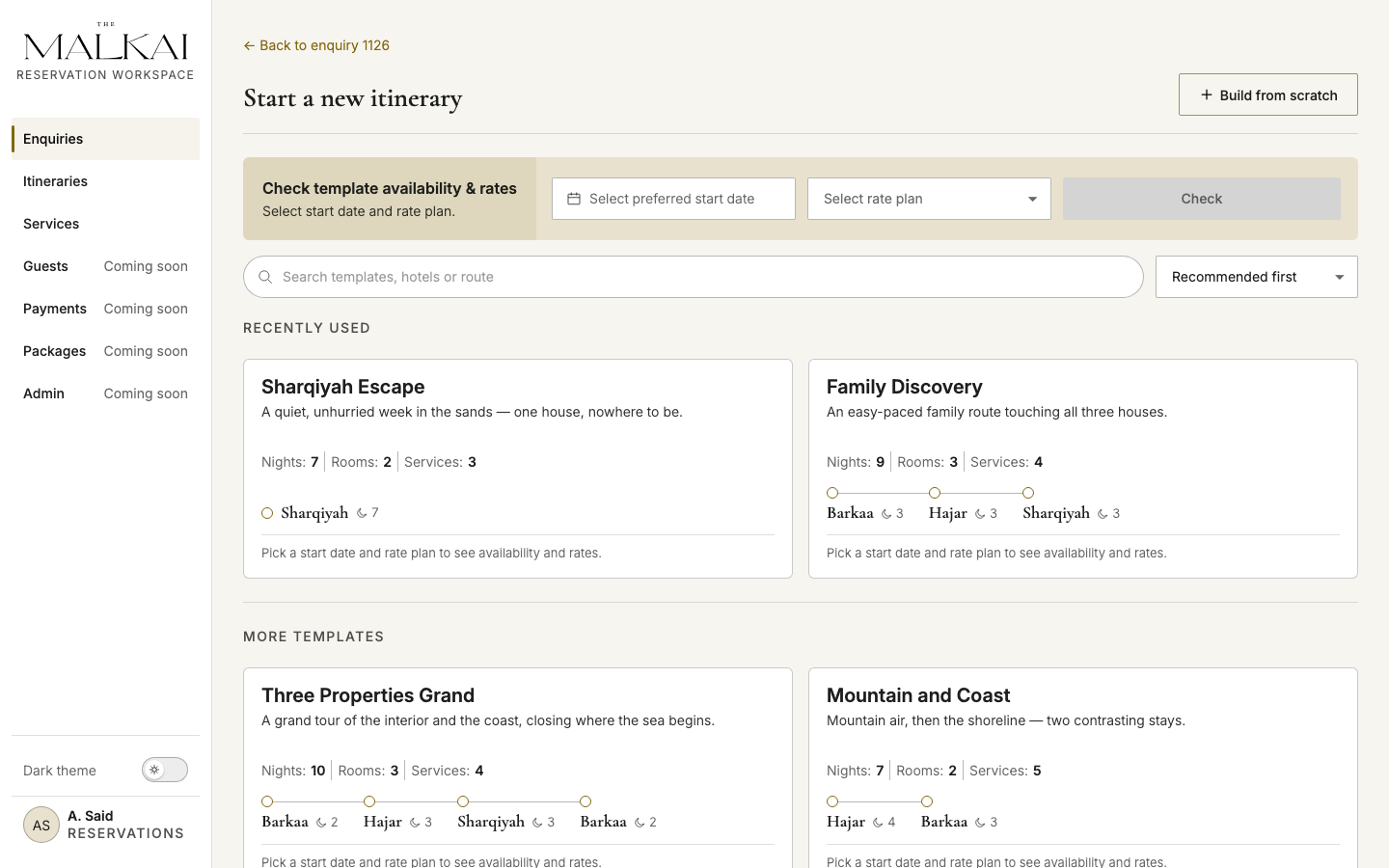
01 / Start
Choose a route structure
- Do this
- From an enquiry, start a new itinerary. Set the preferred date and rate plan, then compare a reusable template with Build from scratch.
- Notice
- Templates accelerate familiar routes without turning them into fixed packages; the same builder remains available for bespoke work.
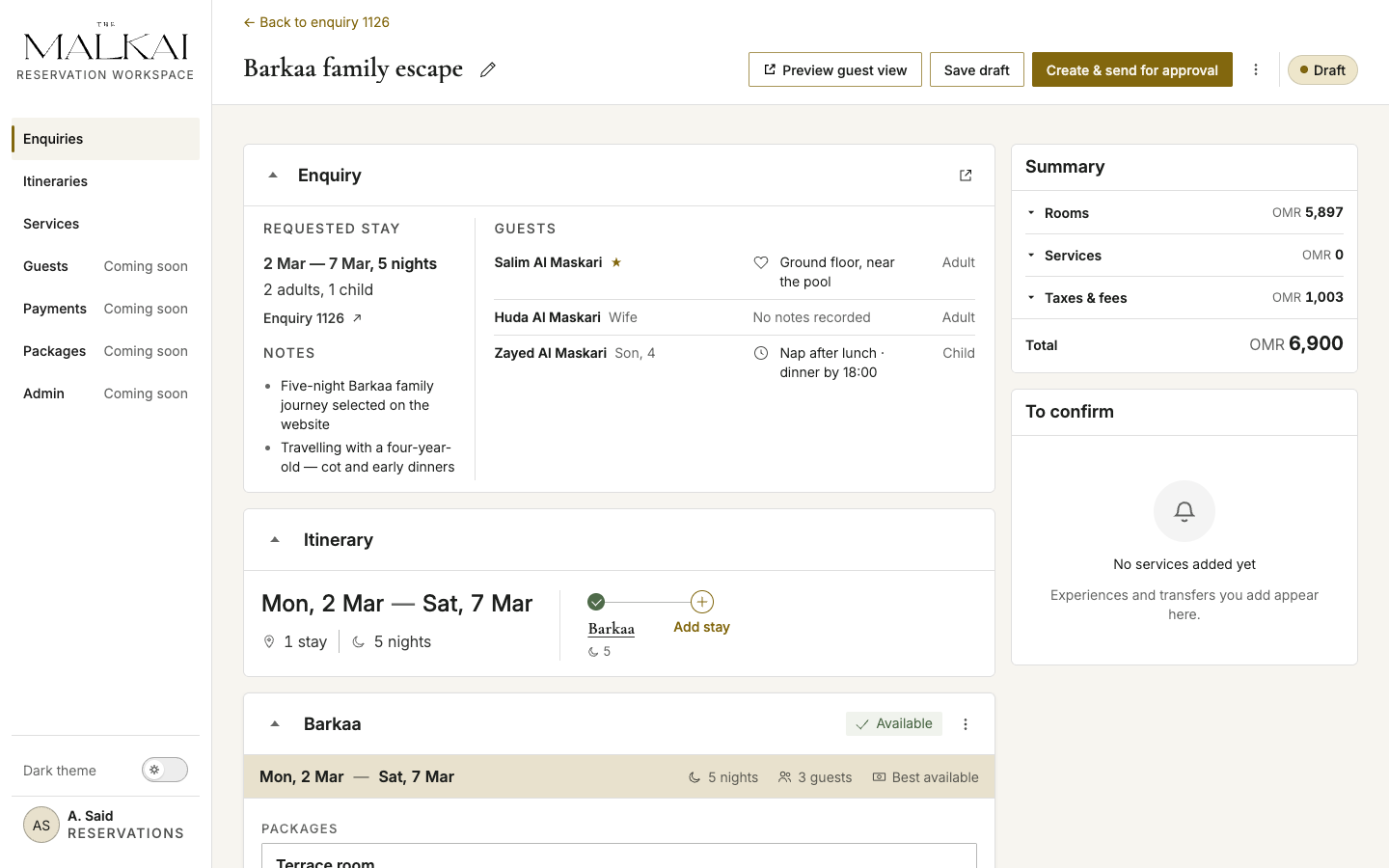
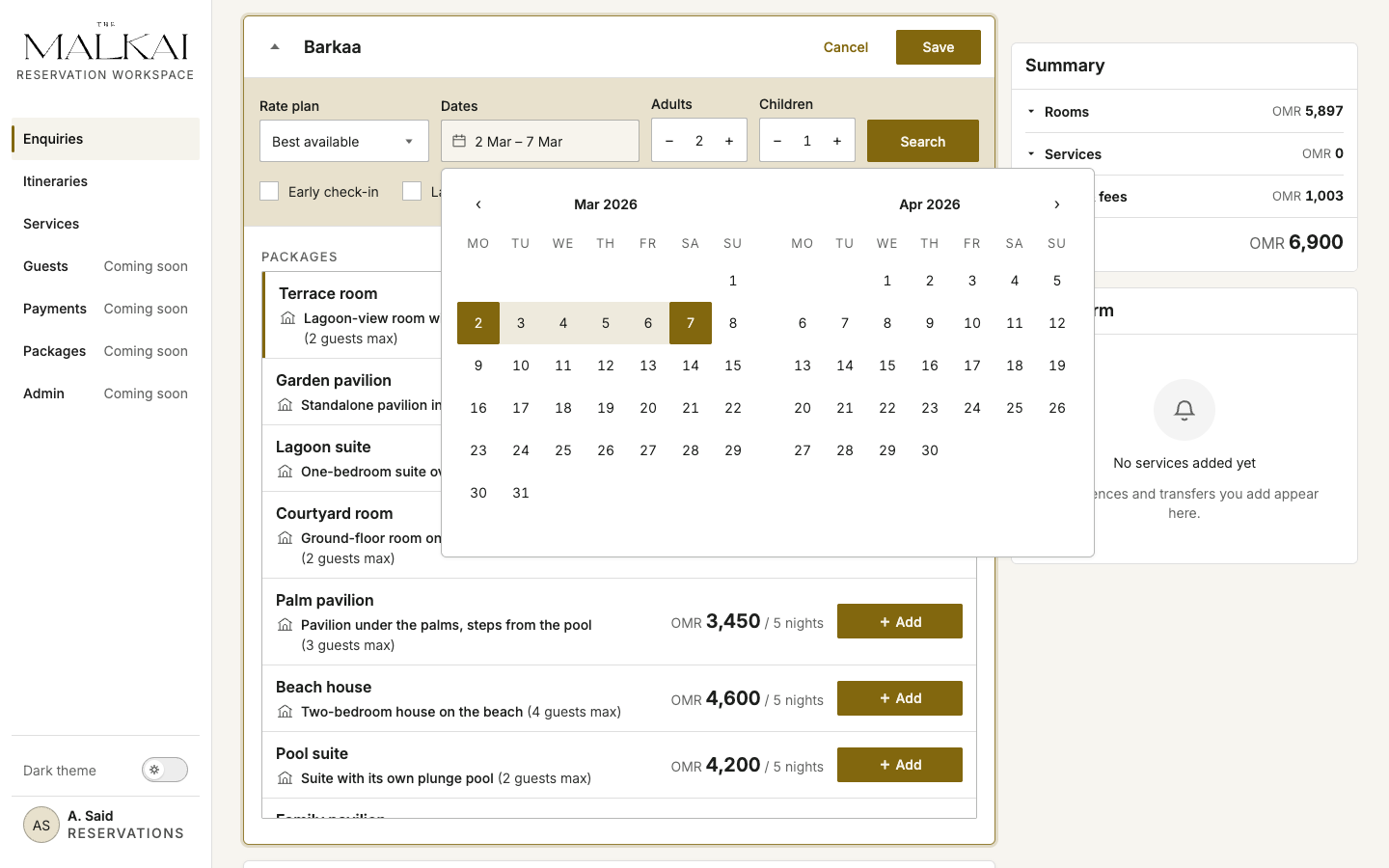
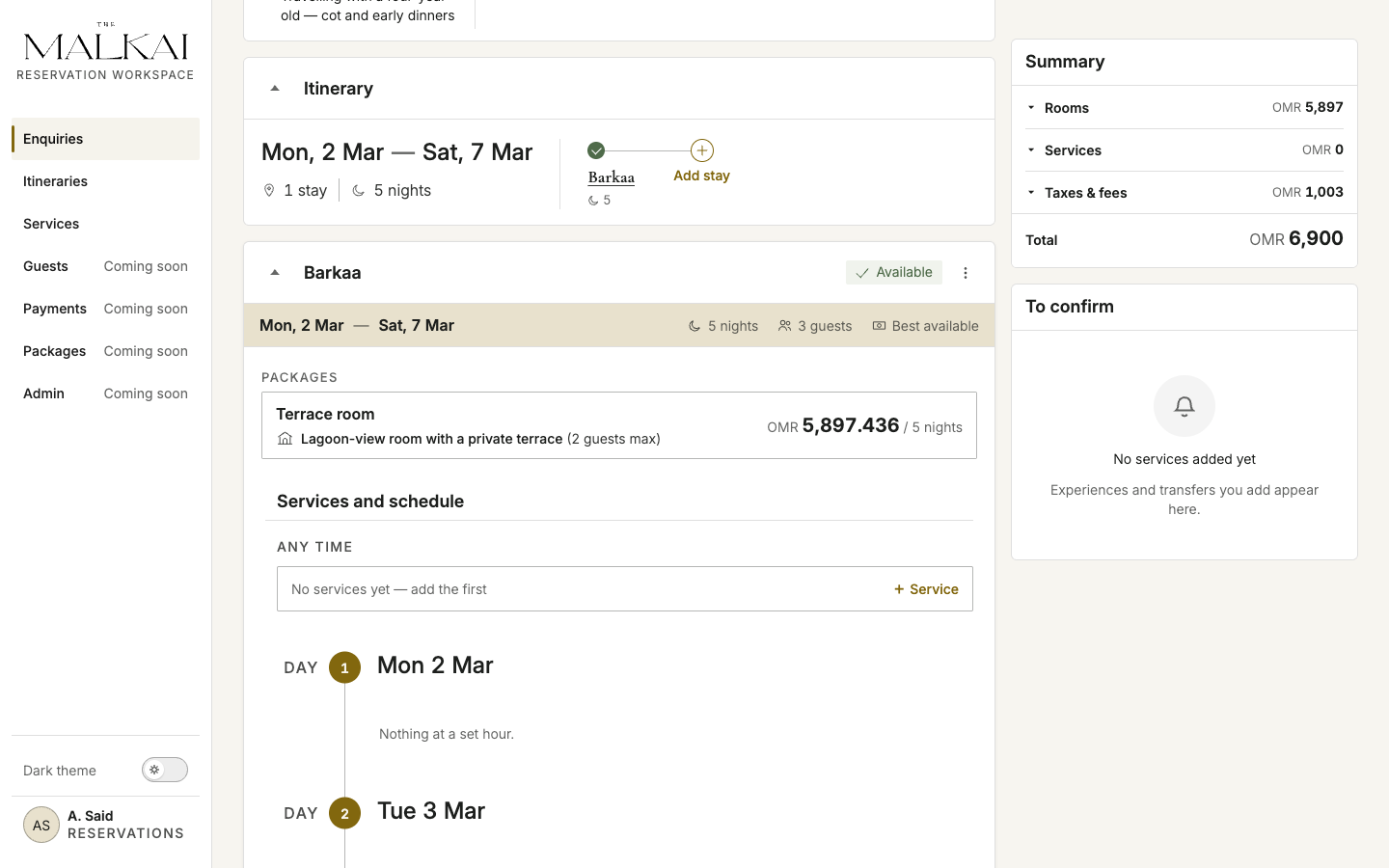
02 / Route
Build the stay sequence
- Do this
- In the Itinerary widget, use Add stay to extend the route. Open a property menu when dates, rate plan, rooms, or guest allocation need to change.
- Notice
- The enquiry context remains above the builder while each property owns its availability and room decisions.
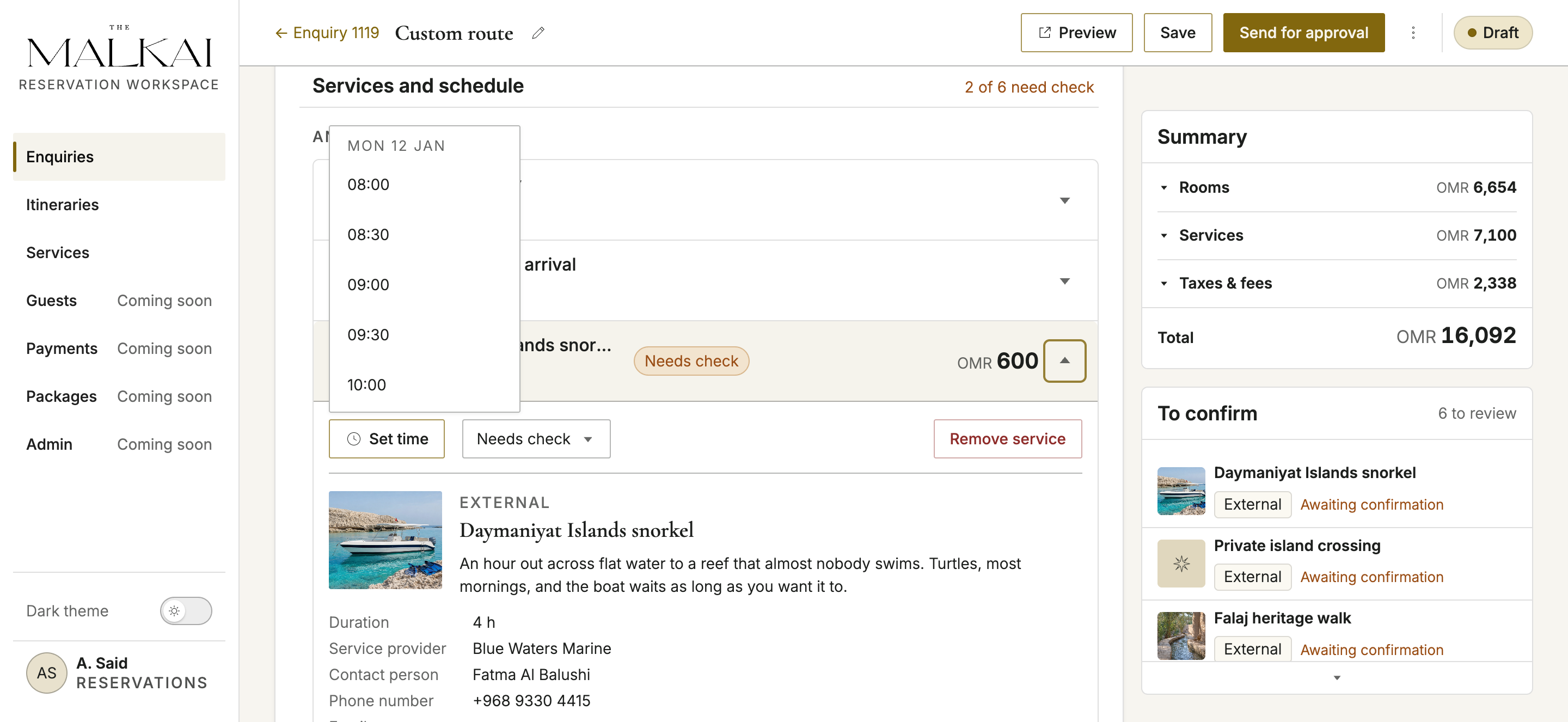
03 / Services
Add and schedule service work
- Do this
- Inside a stay, use + Service. Open the added record to set its day and time; follow anything still awaiting supplier confirmation in To confirm.
- Notice
- Accommodation and services share one journey timeline, while unresolved supplier work stays visible instead of disappearing into notes.
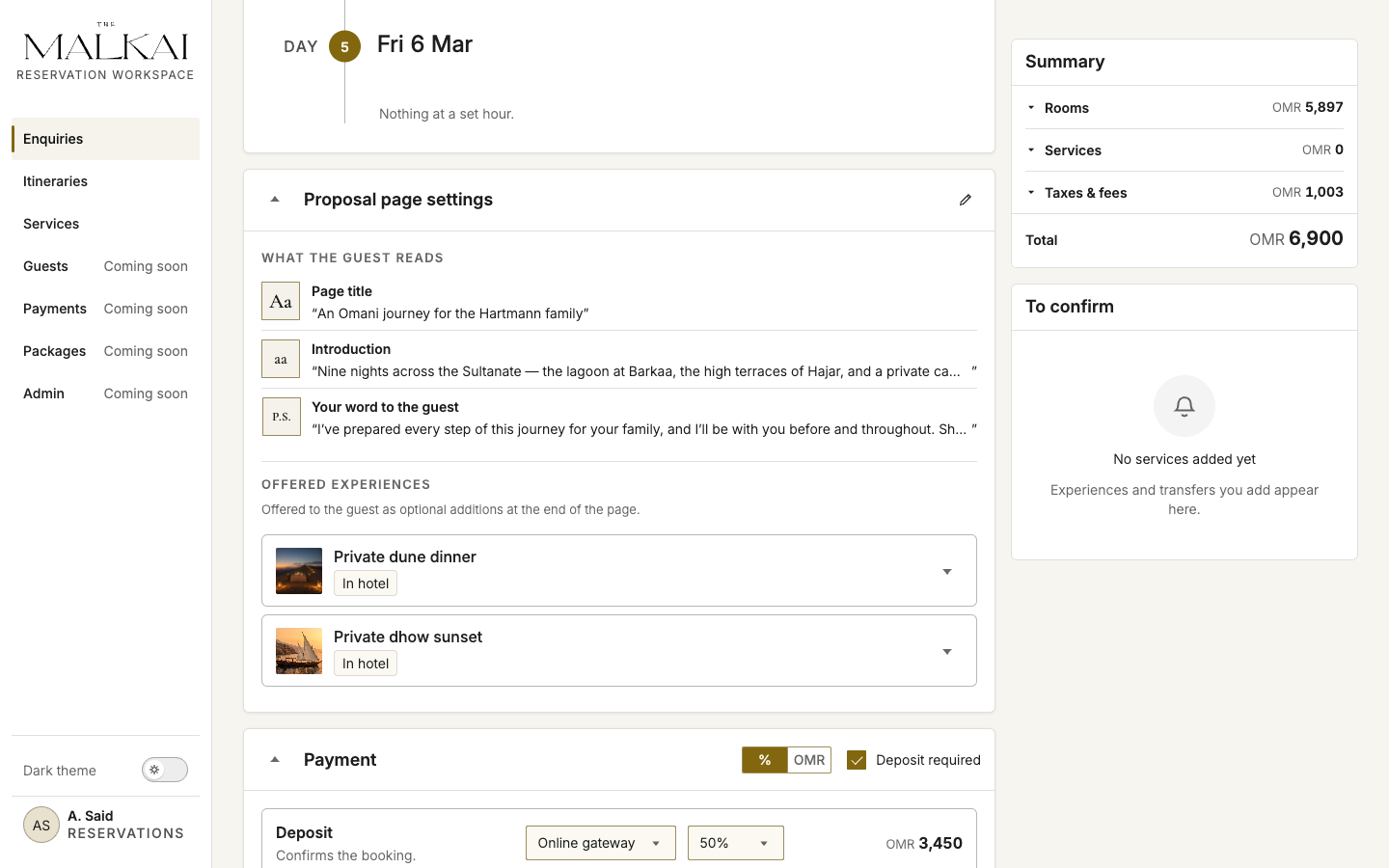
04 / Proposal
Prepare what the guest will receive
- Do this
- Use Proposal page settings for the guest-facing title, introduction, advisor note, and offered experiences. Configure deposit and payment below it.
- Notice
- The proposal is composed from the operational itinerary, but its content and visibility are intentionally controlled.
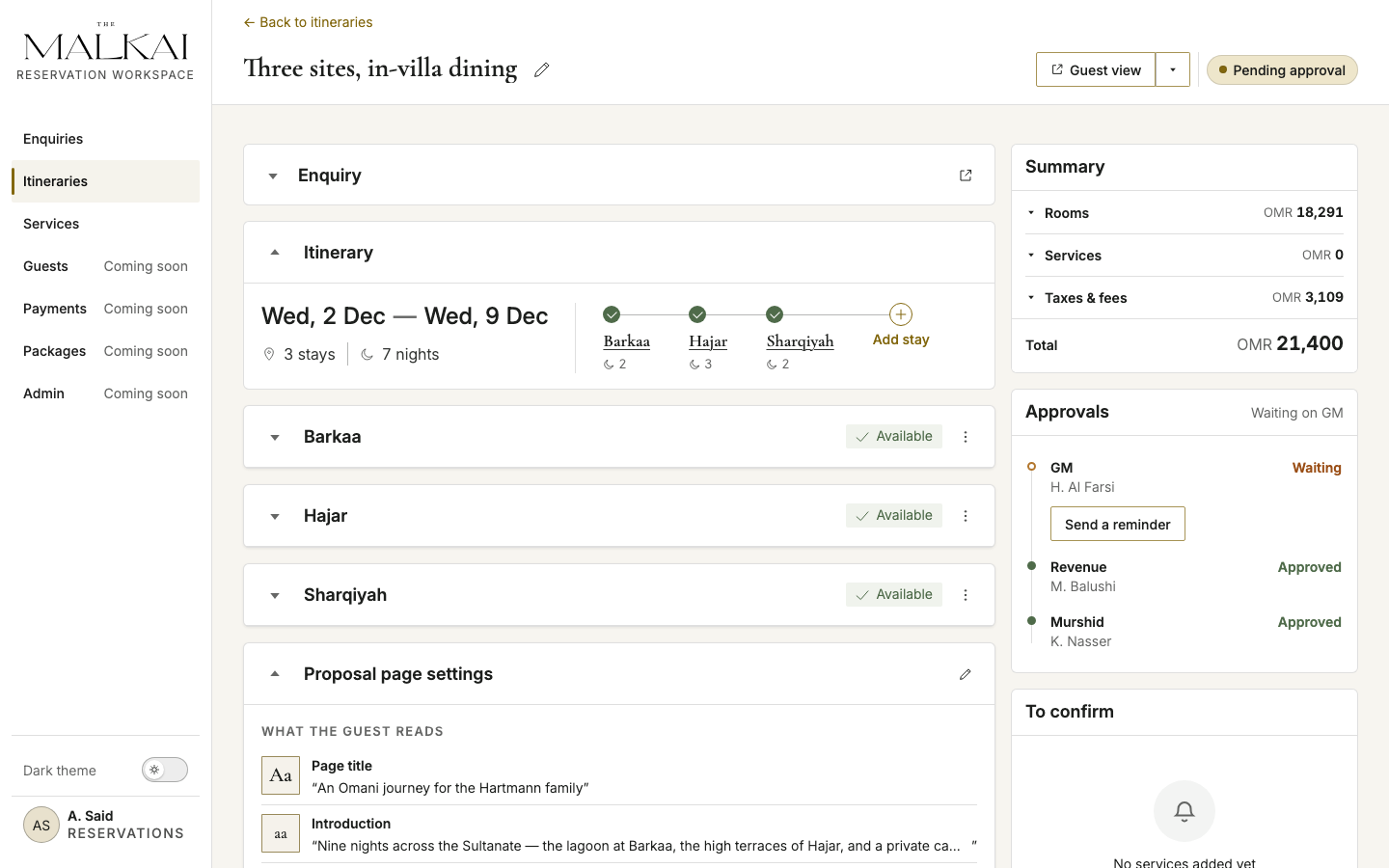
05 / Approval
Inspect the operational gate
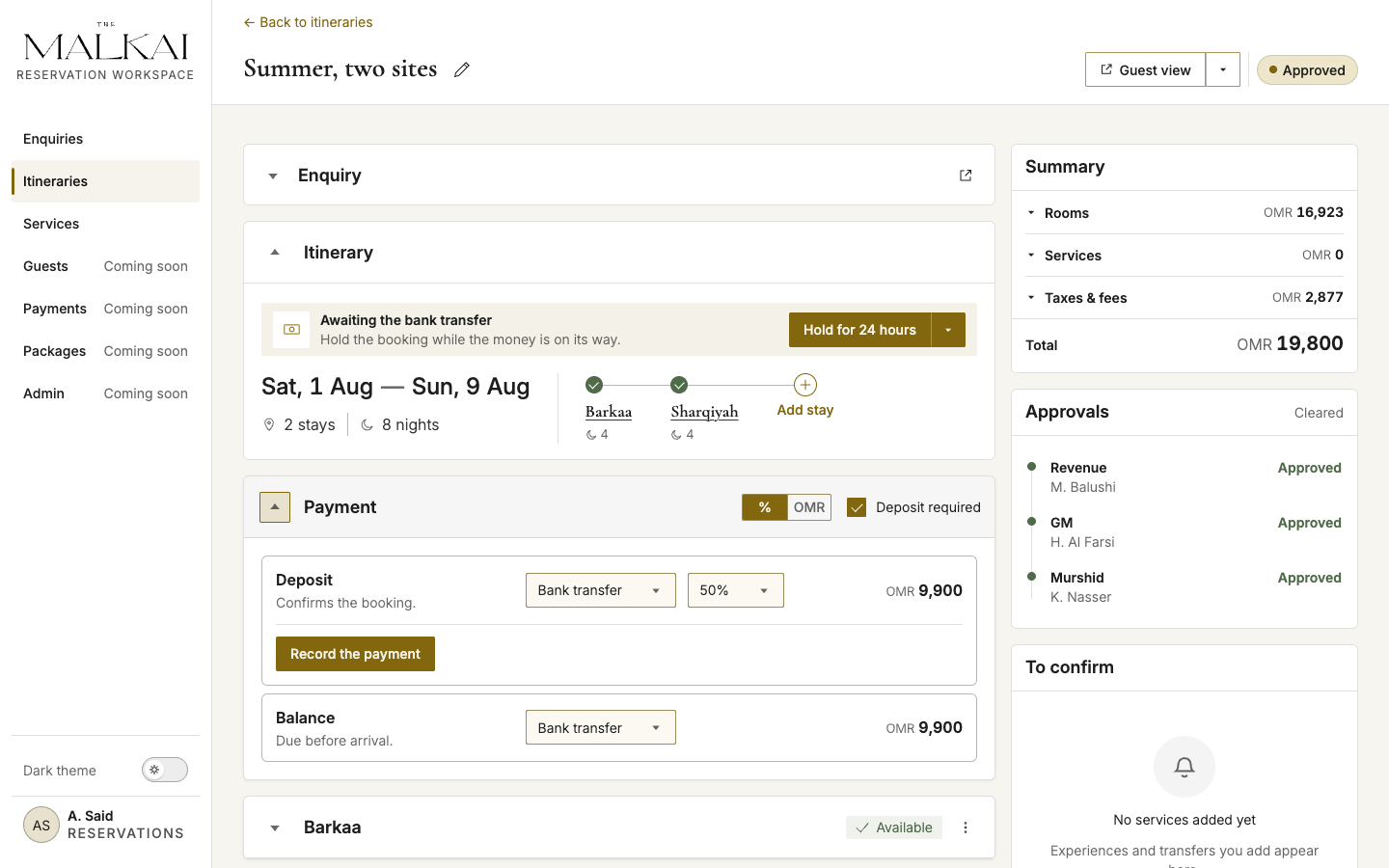
- Do this
- Open a Pending approval itinerary and inspect the Approvals rail. The outstanding reviewer can be reminded without leaving the route.
- Notice
- Revenue, GM, and Murshid decisions remain visible together; a decline returns the route for correction before it can continue.
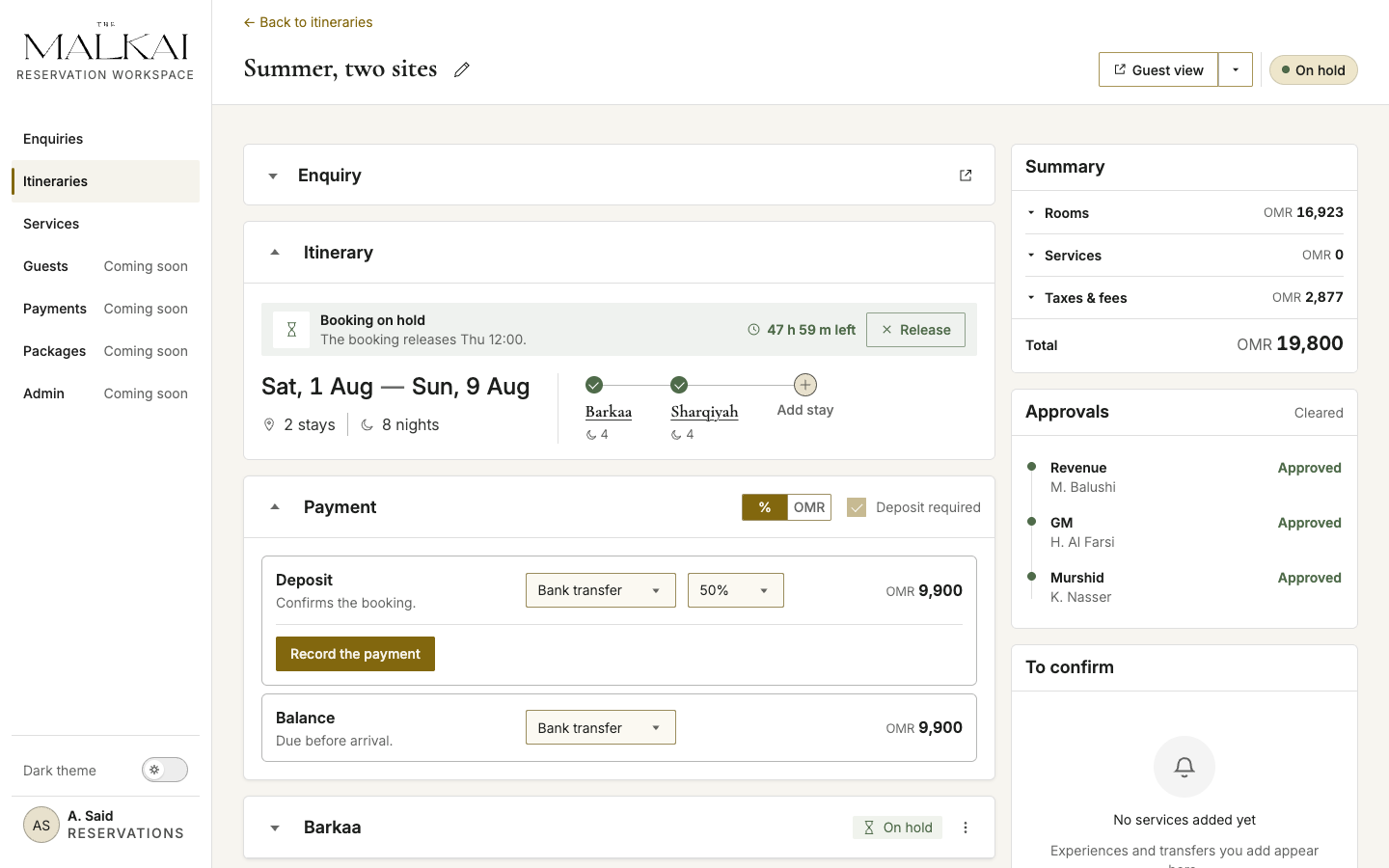
06 / Hold
Protect inventory during manual payment
- Do this
- On an approved itinerary, choose a manual payment method and select the temporary hold window. Inspect the active timer and release action.
- Notice
- The hold is a deliberate operational branch: it protects a payment window without pretending that payment has already confirmed the booking.
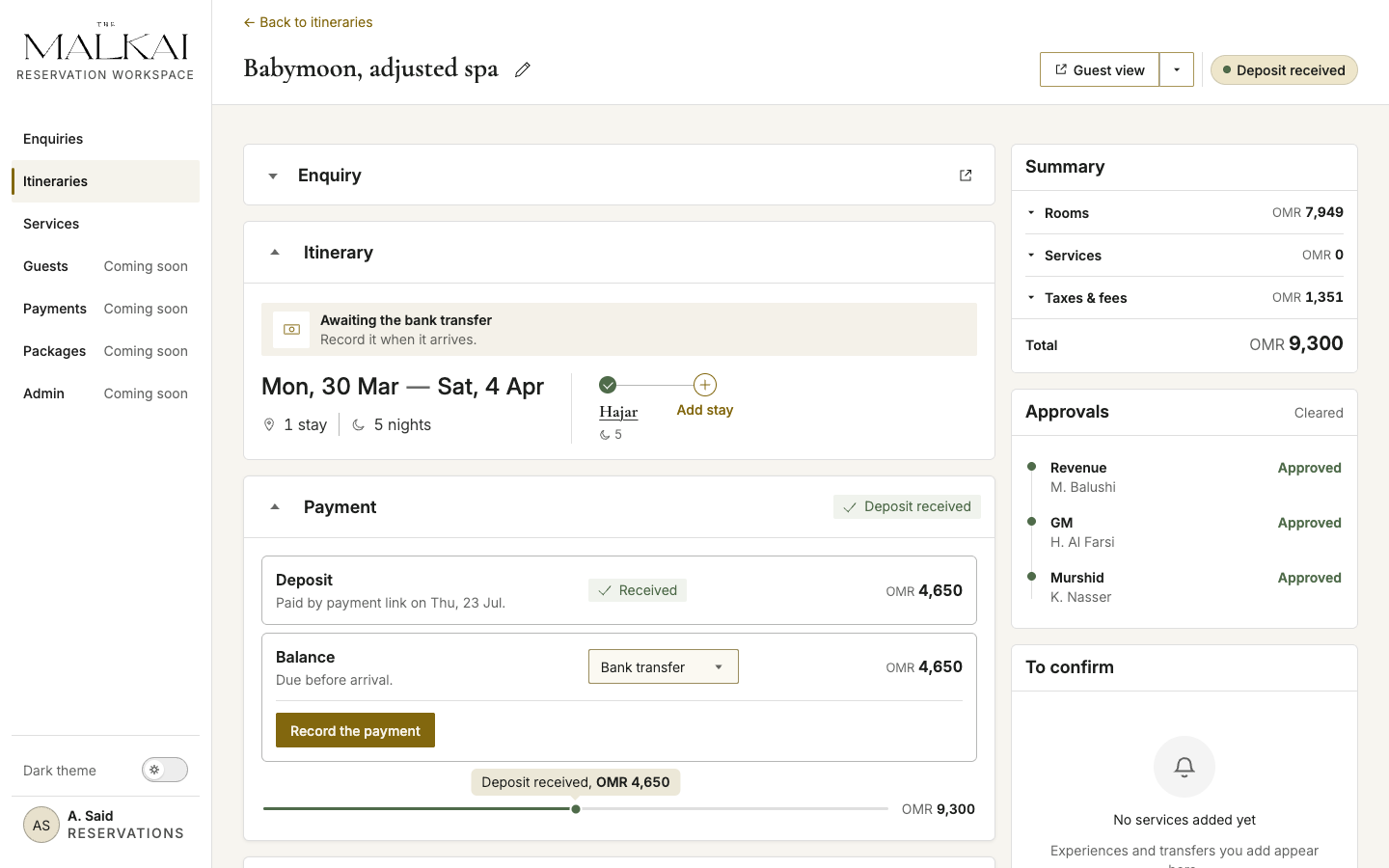
07 / Deposit
Cross the booking boundary
- Do this
- Record the expected deposit in the Payment widget after the manual payment is received.
- Notice
- Deposit received advances the itinerary and its enquiry. The remaining balance stays visible for later recording; this is the end of the prototype’s core pre-booking path.
Covered: enquiry and itinerary lists, template or scratch start, route composition, stays and services, proposal settings, approval, manual payment, room hold, and deposit recording.
Still evolving: component edge cases, PMS/CRM/payment integration details, permissions, and post-booking servicing.
The perimeter
What this case does not claim.
The proof of concept made a product direction tangible and traceable. It did not make it validated, and the difference is worth stating plainly rather than leaving a reader to infer it.
Scope
- Stages 2–5 are designed. Stage 1 and stages 6–9 have no surface.
- The guest handover — the GM pack assembled two weeks out — is a documented operational responsibility outside the current prototype.
- The guest itinerary is a separate static sample. It demonstrates the visibility contract; it does not prove end-to-end data continuity.
- Four of the seven navigation entries are deliberately marked Coming soon rather than dressed as finished pages.
Evidence
- No live reservation agent was ever observed. The estate is pre-opening.
- No end-user research and no production analytics are claimed.
- The phone and tablet layouts were checked in Chrome on an iPhone and in browser emulation, not with the people who will carry them.
- The response SLA disagrees between two client documents — 2 hours against 5 — and stays open.
- The journey map includes team hypotheses about guest sentiment and handoffs; these need validation.
- The status model’s accommodation semantics are gated on a PMS session, not settled.
What to validate first
- Observe reservation agents and test the proposed workflow against real coordination tasks.
- Triage comprehension and the lifecycle vocabulary.
- Whether the two-level status model reads as provenance, or only as colour.
- Continuity between enquiry and builder under real revision cycles.
- Degraded states: stale availability, failed sends, concurrent edits, an expired payment link.
Walk the evidence
Take a look at the prototype.
The front-end proof of concept behind this case. Follow the guide above or explore on your own.
Have a complex product problem?